






新闻中心 
使用Lora技术进行Dreambooth训练【抢先体验版】
 2025-07-21
 浏览次数:次
 返回列表
返回列表本文介绍了使用PaddleNLP等工具进行模型训练与推理的流程。先安装paddlenlp等依赖,再分别用dreambooth lora和文生图lora方式训练,设置参数并保存权重。之后可启动visualdl查看训练出图,最后加载训练好的文件,通过相关代码进行推理生成图像。
☞☞☞AI 智能聊天, 问答助手, AI 智能搜索, 免费无限量使用 DeepSeek R1 模型☜☜☜

1. 安装依赖
- 运行下面的按钮安装依赖,为了确保安装成功,安装完毕请重启内核!(注意:这里只需要运行一次!)
!pip install -U paddlenlp ppdiffusers safetensors --user
Looking in indexes: https://pypi.tuna.tsinghua.edu.cn/simple
Requirement already satisfied: paddlenlp in ./.data/webide/pip/lib/python3.7/site-packages (2.5.1)
Requirement already satisfied: ppdiffusers in ./.data/webide/pip/lib/python3.7/site-packages (0.11.0)
Requirement already satisfied: safetensors in ./.data/webide/pip/lib/python3.7/site-packages (0.2.8)
Requirement already satisfied: paddlefsl in /opt/conda/envs/python35-paddle120-env/lib/python3.7/site-packages (from paddlenlp) (1.1.0)
Requirement already satisfied: sentencepiece in /opt/conda/envs/python35-paddle120-env/lib/python3.7/site-packages (from paddlenlp) (0.1.96)
Requirement already satisfied: huggingface-hub>=0.11.1 in ./.data/webide/pip/lib/python3.7/site-packages (from paddlenlp) (0.12.0)
Requirement already satisfied: seqeval in /opt/conda/envs/python35-paddle120-env/lib/python3.7/site-packages (from paddlenlp) (1.2.2)
Requirement already satisfied: fastapi in ./.data/webide/pip/lib/python3.7/site-packages (from paddlenlp) (0.91.0)
Requirement already satisfied: typer in ./.data/webide/pip/lib/python3.7/site-packages (from paddlenlp) (0.7.0)
Requirement already satisfied: multiprocess<=0.70.12.2 in /opt/conda/envs/python35-paddle120-env/lib/python3.7/site-packages (from paddlenlp) (0.70.11.1)
Requirement already satisfied: jieba in /opt/conda/envs/python35-paddle120-env/lib/python3.7/site-packages (from paddlenlp) (0.42.1)
Requirement already satisfied: Flask-Babel<3.0.0 in /opt/conda/envs/python35-paddle120-env/lib/python3.7/site-packages (from paddlenlp) (1.0.0)
Requirement already satisfied: rich in /opt/conda/envs/python35-paddle120-env/lib/python3.7/site-packages (from paddlenlp) (12.6.0)
Requirement already satisfied: datasets>=2.0.0 in /opt/conda/envs/python35-paddle120-env/lib/python3.7/site-packages (from paddlenlp) (2.7.0)
Requirement already satisfied: paddle2onnx in /opt/conda/envs/python35-paddle120-env/lib/python3.7/site-packages (from paddlenlp) (1.0.0)
Requirement already satisfied: colorama in /opt/conda/envs/python35-paddle120-env/lib/python3.7/site-packages (from paddlenlp) (0.4.4)
Requirement already satisfied: visualdl in /opt/conda/envs/python35-paddle120-env/lib/python3.7/site-packages (from paddlenlp) (2.4.0)
Requirement already satisfied: uvicorn in ./.data/webide/pip/lib/python3.7/site-packages (from paddlenlp) (0.20.0)
Requirement already satisfied: tqdm in /opt/conda/envs/python35-paddle120-env/lib/python3.7/site-packages (from paddlenlp) (4.64.1)
Requirement already satisfied: dill<0.3.5 in /opt/conda/envs/python35-paddle120-env/lib/python3.7/site-packages (from paddlenlp) (0.3.3)
Requirement already satisfied: colorlog in /opt/conda/envs/python35-paddle120-env/lib/python3.7/site-packages (from paddlenlp) (4.1.0)
Requirement already satisfied: Pillow in /opt/conda/envs/python35-paddle120-env/lib/python3.7/site-packages (from ppdiffusers) (8.2.0)
Requirement already satisfied: regex in ./.data/webide/pip/lib/python3.7/site-packages (from ppdiffusers) (2025.10.31)
Requirement already satisfied: ftfy in ./.data/webide/pip/lib/python3.7/site-packages (from ppdiffusers) (6.1.1)
Requirement already satisfied: pyyaml>=5.1 in /opt/conda/envs/python35-paddle120-env/lib/python3.7/site-packages (from datasets>=2.0.0->paddlenlp) (5.1.2)
Requirement already satisfied: numpy>=1.17 in /opt/conda/envs/python35-paddle120-env/lib/python3.7/site-packages (from datasets>=2.0.0->paddlenlp) (1.19.5)
Requirement already satisfied: pyarrow>=6.0.0 in /opt/conda/envs/python35-paddle120-env/lib/python3.7/site-packages (from datasets>=2.0.0->paddlenlp) (10.0.0)
Requirement already satisfied: fsspec[http]>=2025.11.1 in /opt/conda/envs/python35-paddle120-env/lib/python3.7/site-packages (from datasets>=2.0.0->paddlenlp) (2025.11.0)
Requirement already satisfied: requests>=2.19.0 in /opt/conda/envs/python35-paddle120-env/lib/python3.7/site-packages (from datasets>=2.0.0->paddlenlp) (2.24.0)
Requirement already satisfied: xxhash in /opt/conda/envs/python35-paddle120-env/lib/python3.7/site-packages (from datasets>=2.0.0->paddlenlp) (3.1.0)
Requirement already satisfied: importlib-metadata in /opt/conda/envs/python35-paddle120-env/lib/python3.7/site-packages (from datasets>=2.0.0->paddlenlp) (4.2.0)
Requirement already satisfied: packaging in /opt/conda/envs/python35-paddle120-env/lib/python3.7/site-packages (from datasets>=2.0.0->paddlenlp) (21.3)
Requirement already satisfied: aiohttp in /opt/conda/envs/python35-paddle120-env/lib/python3.7/site-packages (from datasets>=2.0.0->paddlenlp) (3.8.3)
Requirement already satisfied: responses<0.19 in /opt/conda/envs/python35-paddle120-env/lib/python3.7/site-packages (from datasets>=2.0.0->paddlenlp) (0.18.0)
Requirement already satisfied: pandas in /opt/conda/envs/python35-paddle120-env/lib/python3.7/site-packages (from datasets>=2.0.0->paddlenlp) (1.1.5)
Requirement already satisfied: Jinja2>=2.5 in /opt/conda/envs/python35-paddle120-env/lib/python3.7/site-packages (from Flask-Babel<3.0.0->paddlenlp) (3.0.0)
Requirement already satisfied: pytz in /opt/conda/envs/python35-paddle120-env/lib/python3.7/site-packages (from Flask-Babel<3.0.0->paddlenlp) (2019.3)
Requirement already satisfied: Babel>=2.3 in /opt/conda/envs/python35-paddle120-env/lib/python3.7/site-packages (from Flask-Babel<3.0.0->paddlenlp) (2.8.0)
Requirement already satisfied: Flask in /opt/conda/envs/python35-paddle120-env/lib/python3.7/site-packages (from Flask-Babel<3.0.0->paddlenlp) (1.1.1)
Requirement already satisfied: filelock in /opt/conda/envs/python35-paddle120-env/lib/python3.7/site-packages (from huggingface-hub>=0.11.1->paddlenlp) (3.0.12)
Requirement already satisfied: typing-extensions>=3.7.4.3 in /opt/conda/envs/python35-paddle120-env/lib/python3.7/site-packages (from huggingface-hub>=0.11.1->paddlenlp) (4.3.0)
Requirement already satisfied: starlette<0.25.0,>=0.24.0 in ./.data/webide/pip/lib/python3.7/site-packages (from fastapi->paddlenlp) (0.24.0)
Requirement already satisfied: pydantic!=1.7,!=1.7.1,!=1.7.2,!=1.7.3,!=1.8,!=1.8.1,<2.0.0,>=1.6.2 in ./.data/webide/pip/lib/python3.7/site-packages (from fastapi->paddlenlp) (1.10.4)
Requirement already satisfied: wcwidth>=0.2.5 in ./.data/webide/pip/lib/python3.7/site-packages (from ftfy->ppdiffusers) (0.2.6)
Requirement already satisfied: pygments<3.0.0,>=2.6.0 in /opt/conda/envs/python35-paddle120-env/lib/python3.7/site-packages (from rich->paddlenlp) (2.13.0)
Requirement already satisfied: commonmark<0.10.0,>=0.9.0 in /opt/conda/envs/python35-paddle120-env/lib/python3.7/site-packages (from rich->paddlenlp) (0.9.1)
Requirement already satisfied: scikit-learn>=0.21.3 in /opt/conda/envs/python35-paddle120-env/lib/python3.7/site-packages (from seqeval->paddlenlp) (0.24.2)
Requirement already satisfied: click<9.0.0,>=7.1.1 in /opt/conda/envs/python35-paddle120-env/lib/python3.7/site-packages (from typer->paddlenlp) (8.0.4)
Requirement already satisfied: h21>=0.8 in ./.data/webide/pip/lib/python3.7/site-packages (from uvicorn->paddlenlp) (0.14.0)
Requirement already satisfied: matplotlib in /opt/conda/envs/python35-paddle120-env/lib/python3.7/site-packages (from visualdl->paddlenlp) (2.2.3)
Requirement already satisfied: six>=1.14.0 in /opt/conda/envs/python35-paddle120-env/lib/python3.7/site-packages (from visualdl->paddlenlp) (1.16.0)
Requirement already satisfied: protobuf>=3.11.0 in /opt/conda/envs/python35-paddle120-env/lib/python3.7/site-packages (from visualdl->paddlenlp) (3.20.0)
Requirement already satisfied: bce-python-sdk in /opt/conda/envs/python35-paddle120-env/lib/python3.7/site-packages (from visualdl->paddlenlp) (0.8.53)
Requirement already satisfied: Werkzeug>=0.15 in /opt/conda/envs/python35-paddle120-env/lib/python3.7/site-packages (from Flask->Flask-Babel<3.0.0->paddlenlp) (0.16.0)
Requirement already satisfied: itsdangerous>=0.24 in /opt/conda/envs/python35-paddle120-env/lib/python3.7/site-packages (from Flask->Flask-Babel<3.0.0->paddlenlp) (1.1.0)
Requirement already satisfied: attrs>=17.3.0 in /opt/conda/envs/python35-paddle120-env/lib/python3.7/site-packages (from aiohttp->datasets>=2.0.0->paddlenlp) (22.1.0)
Requirement already satisfied: aiosignal>=1.1.2 in /opt/conda/envs/python35-paddle120-env/lib/python3.7/site-packages (from aiohttp->datasets>=2.0.0->paddlenlp) (1.2.0)
Requirement already satisfied: multidict<7.0,>=4.5 in /opt/conda/envs/python35-paddle120-env/lib/python3.7/site-packages (from aiohttp->datasets>=2.0.0->paddlenlp) (6.0.2)
Requirement already satisfied: async-timeout<5.0,>=4.0.0a3 in /opt/conda/envs/python35-paddle120-env/lib/python3.7/site-packages (from aiohttp->datasets>=2.0.0->paddlenlp) (4.0.2)
Requirement already satisfied: asynctest==0.13.0 in /opt/conda/envs/python35-paddle120-env/lib/python3.7/site-packages (from aiohttp->datasets>=2.0.0->paddlenlp) (0.13.0)
Requirement already satisfied: frozenlist>=1.1.1 in /opt/conda/envs/python35-paddle120-env/lib/python3.7/site-packages (from aiohttp->datasets>=2.0.0->paddlenlp) (1.3.0)
Requirement already satisfied: yarl<2.0,>=1.0 in /opt/conda/envs/python35-paddle120-env/lib/python3.7/site-packages (from aiohttp->datasets>=2.0.0->paddlenlp) (1.7.2)
Requirement already satisfied: charset-normalizer<3.0,>=2.0 in /opt/conda/envs/python35-paddle120-env/lib/python3.7/site-packages (from aiohttp->datasets>=2.0.0->paddlenlp) (2.1.1)
Requirement already satisfied: MarkupSafe>=2.0.0rc2 in /opt/conda/envs/python35-paddle120-env/lib/python3.7/site-packages (from Jinja2>=2.5->Flask-Babel<3.0.0->paddlenlp) (2.0.1)
Requirement already satisfied: pyparsing!=3.0.5,>=2.0.2 in /opt/conda/envs/python35-paddle120-env/lib/python3.7/site-packages (from packaging->datasets>=2.0.0->paddlenlp) (3.0.9)
Requirement already satisfied: certifi>=2017.4.17 in /opt/conda/envs/python35-paddle120-env/lib/python3.7/site-packages (from requests>=2.19.0->datasets>=2.0.0->paddlenlp) (2019.9.11)
Requirement already satisfied: urllib3!=1.25.0,!=1.25.1,<1.26,>=1.21.1 in /opt/conda/envs/python35-paddle120-env/lib/python3.7/site-packages (from requests>=2.19.0->datasets>=2.0.0->paddlenlp) (1.25.11)
Requirement already satisfied: chardet<4,>=3.0.2 in /opt/conda/envs/python35-paddle120-env/lib/python3.7/site-packages (from requests>=2.19.0->datasets>=2.0.0->paddlenlp) (3.0.4)
Requirement already satisfied: idna<3,>=2.5 in /opt/conda/envs/python35-paddle120-env/lib/python3.7/site-packages (from requests>=2.19.0->datasets>=2.0.0->paddlenlp) (2.8)
Requirement already satisfied: scipy>=0.19.1 in /opt/conda/envs/python35-paddle120-env/lib/python3.7/site-packages (from scikit-learn>=0.21.3->seqeval->paddlenlp) (1.6.3)
Requirement already satisfied: joblib>=0.11 in /opt/conda/envs/python35-paddle120-env/lib/python3.7/site-packages (from scikit-learn>=0.21.3->seqeval->paddlenlp) (0.14.1)
Requirement already satisfied: threadpoolctl>=2.0.0 in /opt/conda/envs/python35-paddle120-env/lib/python3.7/site-packages (from scikit-learn>=0.21.3->seqeval->paddlenlp) (2.1.0)
Requirement already satisfied: anyio<5,>=3.4.0 in /opt/conda/envs/python35-paddle120-env/lib/python3.7/site-packages (from starlette<0.25.0,>=0.24.0->fastapi->paddlenlp) (3.6.1)
Requirement already satisfied: future>=0.6.0 in /opt/conda/envs/python35-paddle120-env/lib/python3.7/site-packages (from bce-python-sdk->visualdl->paddlenlp) (0.18.0)
Requirement already satisfied: pycryptodome>=3.8.0 in /opt/conda/envs/python35-paddle120-env/lib/python3.7/site-packages (from bce-python-sdk->visualdl->paddlenlp) (3.9.9)
Requirement already satisfied: zipp>=0.5 in /opt/conda/envs/python35-paddle120-env/lib/python3.7/site-packages (from importlib-metadata->datasets>=2.0.0->paddlenlp) (3.8.1)
Requirement already satisfied: kiwisolver>=1.0.1 in /opt/conda/envs/python35-paddle120-env/lib/python3.7/site-packages (from matplotlib->visualdl->paddlenlp) (1.1.0)
Requirement already satisfied: python-dateutil>=2.1 in /opt/conda/envs/python35-paddle120-env/lib/python3.7/site-packages (from matplotlib->visualdl->paddlenlp) (2.8.2)
Requirement already satisfied: cycler>=0.10 in /opt/conda/envs/python35-paddle120-env/lib/python3.7/site-packages (from matplotlib->visualdl->paddlenlp) (0.10.0)
Requirement already satisfied: sniffio>=1.1 in /opt/conda/envs/python35-paddle120-env/lib/python3.7/site-packages (from anyio<5,>=3.4.0->starlette<0.25.0,>=0.24.0->fastapi->paddlenlp) (1.3.0)
Requirement already satisfied: setuptools in /opt/conda/envs/python35-paddle120-env/lib/python3.7/site-packages (from kiwisolver>=1.0.1->matplotlib->visualdl->paddlenlp) (56.2.0)[notice] A new release of pip *ailable: 22.1.2 -> 23.0.1[notice] To update, run: pip install --upgrade pip
2. 准备要训练的图片
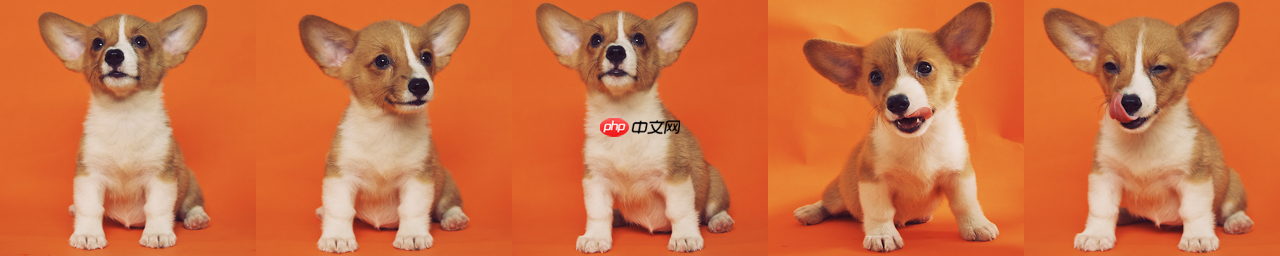
- 在这里我们已经在dogs文件夹准备好了如下所示的5张图片。
3. 开始训练
参数解释:
- pretrained_model_name_or_path :想要训练的模型名称,例如:"runwayml/stable-diffusion-v1-5",更多模型可参考 paddlenlp 文档
- instance_data_dir:想要训练的图片地址。
- instance_prompt:训练的prompt文本。
- resolution:训练时图像的大小,建议为512。
- train_batch_size:训练时候使用的batch_size,可不修改。
- gradient_accumulation_steps:梯度累积的步数,可不修改。
- checkpointing_steps:每隔多少步保存模型。
- learning_rate:训练使用的学习率。
- report_to:我们将训练过程中出的图片导出到visudl工具中。
- lr_scheduler:学习率衰减策略,可以是:"linear", "constant", "cosine","cosine_with_restarts"等。
- lr_warmup_steps:学习率衰减前,warmup到最大学习率所需要的步数。
- max_train_steps:最多训练多少步。
- validation_prompt:训练的过程中我们会评估训练的怎么样,因此我们需要设置评估使用的prompt文本。
- validation_epochs:每隔多少个epoch评估模型,我们可以查看训练的进度条,知道当前到了第几个epoch。
- validation_guidance_scale:评估过程中的CFG引导值,默认为5.0.
- seed:随机种子,设置后可以复现训练结果。
- lora_rank:lora 的 rank值,默认为128,与开源的版本保持一致。
- use_lion:表示是否使用lion优化器,如果我们不想使用lion的话需要把 --use_lion True 表示使用 --use_lion False 表示不使用。
- lora_weight_or_path:我们需要加载的lora权重,当前支持:pt,ckpt,safetensors,和pdparams这些格式,可直接加载这里的lora权重 https://civitai.com/models。
注意:
- 会保存2种格式的权重,一个是paddle的,一个是safetensors的,可以使用 https://github.com/bmaltais/kohya_ss 这个人的加载。
dreambooth lora
In [6]!python train_dreambooth_lora.py \ --pretrained_model_name_or_path="runwayml/stable-diffusion-v1-5" \ --instance_data_dir="./dogs" \ --output_dir="./dream_booth_lora_outputs" \ --instance_prompt="a photo of sks dog" \ --resolution=512 \ --train_batch_size=1 \ --gradient_accumulation_steps=1 \ --checkpointing_steps=100 \ --learning_rate=1e-4 \ --report_to="visualdl" \ --lr_scheduler="constant" \ --lr_warmup_steps=0 \ --max_train_steps=500 \ --lora_rank=128 \ --validation_prompt="A photo of sks dog in a bucket" \ --validation_epochs=25 \ --validation_guidance_scale=5.0 \ --use_lion False \ --seed=0
[2025-02-23 10:13:09,015] [ WARNING] - You are using a model of type clip_text_model to instantiate a model of type . This is not supported for all configurations of models and can yield errors.
W0223 10:13:09.018703 11490 gpu_resources.cc:61] Please NOTE: device: 0, GPU Compute Capability: 7.0, Driver API Version: 11.2, Runtime API Version: 11.2
W0223 10:13:09.022612 11490 gpu_resources.cc:91] device: 0, cuDNN Version: 8.2.
Train Steps:  20%|███████████████████████▌                                                                                              | 100/500 [01:12<03:04,  2.16it/s, epoch=0019, step_loss=0.0413]S*ed lora weights to ./dream_booth_lora_outputs/checkpoint-100
Train Steps:  40%|███████████████████████████████████████████████▌                                                                       | 200/500 [02:25<02:19,  2.15it/s, epoch=0039, step_loss=0.446]S*ed lora weights to ./dream_booth_lora_outputs/checkpoint-200
Train Steps:  60%|██████████████████████████████████████████████████████████████████████▏                                              | 300/500 [03:37<01:33,  2.13it/s, epoch=0059, step_loss=0.00273]S*ed lora weights to ./dream_booth_lora_outputs/checkpoint-300
Train Steps:  80%|███████████████████████████████████████████████████████████████████████████████████████████████▏                       | 400/500 [04:53<00:47,  2.11it/s, epoch=0079, step_loss=0.275]S*ed lora weights to ./dream_booth_lora_outputs/checkpoint-400
Train Steps: 100%|█████████████████████████████████████████████████████████████████████████████████████████████████████████████████████| 500/500 [05:44<00:00,  2.14it/s, epoch=0099, step_loss=0.00985]S*ed lora weights to ./dream_booth_lora_outputs/checkpoint-500
S*ed final lora weights to ./dream_booth_lora_outputs
Train Steps: 100%|█████████████████████████████████████████████████████████████████████████████████████████████████████████████████████| 500/500 [05:48<00:00,  1.43it/s, epoch=0099, step_loss=0.00985]
文生图 lora
--train_data_dir 这个需要放图文对的文件夹,里面是图片和txt。
 美图云修
美图云修
商业级AI影像处理工具
 50
查看详情
50
查看详情

--image_format 表示 train_data_dir 文件夹内的图片格式,比如png,jpg,jpeg
--use_lion Fasle 表示不使用lion优化器。
In [3]!python train_text_to_image_lora.py \ --pretrained_model_name_or_path="runwayml/stable-diffusion-v1-5" \ --output_dir="./text_to_image_lora_outputs3" \ --train_data_dir="mishanwu" \ --image_format="png" \ --resolution=512 \ --train_batch_size=1 \ --gradient_accumulation_steps=1 \ --checkpointing_steps=500 \ --learning_rate=6e-5 \ --report_to="visualdl" \ --lr_scheduler="cosine_with_restarts" \ --lr_warmup_steps=0 \ --max_train_steps=1000 \ --lora_rank=128 \ --validation_prompt="1girl, solo, black_background, looking_at_viewer, parted_lips, tears, brown_eyes" \ --validation_epochs=1 \ --validation_guidance_scale=5.0 \ --use_lion False \ --seed=0
[2025-02-23 11:11:34,386] [ WARNING] - You are using a model of type clip_text_model to instantiate a model of type . This is not supported for all configurations of models and can yield errors.
W0223 11:11:34.389356  7327 gpu_resources.cc:61] Please NOTE: device: 0, GPU Compute Capability: 7.0, Driver API Version: 11.2, Runtime API Version: 11.2
W0223 11:11:34.392953  7327 gpu_resources.cc:91] device: 0, cuDNN Version: 8.2.
Resolving data files: 100%|████████████████| 581/581 [00:00<00:00, 50722.06it/s]
Using custom data configuration default-4fb24e511b7f6118
Downloading and preparing dataset imagefolder/default to /home/aistudio/.cache/huggingface/datasets/imagefolder/default-4fb24e511b7f6118/0.0.0/37fbb85cc714a338bea574ac6c7d0b5be5aff46c1862c1989b20e0771199e93f...
Downloading data files #0:   0%|                        | 0/19 [00:00<?, ?obj/s]


Downloading data files #3:   0%|                        | 0/18 [00:00<?, ?obj/s]
Downloading data files #1:   0%|                        | 0/19 [00:00<?, ?obj/s]


Downloading data files #7:   0%|                        | 0/18 [00:00<?, ?obj/s]


Downloading data files #6:   0%|                        | 0/18 [00:00<?, ?obj/s]


Downloading data files #4:   0%|                        | 0/18 [00:00<?, ?obj/s]

Downloading data files #0: 100%|█████████████| 19/19 [00:00<00:00, 3045.97obj/s]
Downloading data files #3: 100%|█████████████| 18/18 [00:00<00:00, 2919.24obj/s]


Downloading data files #10:   0%|                       | 0/18 [00:00<?, ?obj/s]


Downloading data files #11:   0%|                       | 0/18 [00:00<?, ?obj/s]


Downloading data files #1: 100%|█████████████| 19/19 [00:00<00:00, 2589.92obj/s]
Downloading data files #4: 100%|█████████████| 18/18 [00:00<00:00, 4414.54obj/s]
Downloading data files #7: 100%|█████████████| 18/18 [00:00<00:00, 2468.45obj/s]


Downloading data files #6: 100%|█████████████| 18/18 [00:00<00:00, 2742.57obj/s]


Downloading data files #2: 100%|█████████████| 19/19 [00:00<00:00, 3250.74obj/s]


Downloading data files #12:   0%|                       | 0/18 [00:00<?, ?obj/s]


Downloading data files #13:   0%|                       | 0/18 [00:00<?, ?obj/s]


Downloading data files #8:   0%|                        | 0/18 [00:00<?, ?obj/s]


Downloading data files #10: 100%|████████████| 18/18 [00:00<00:00, 2681.49obj/s]
Downloading data files #11: 100%|████████████| 18/18 [00:00<00:00, 2829.21obj/s]
Downloading data files #15: 100%|████████████| 18/18 [00:00<00:00, 5331.37obj/s]
Downloading data files #5: 100%|█████████████| 18/18 [00:00<00:00, 2877.96obj/s]
Downloading data files #13: 100%|████████████| 18/18 [00:00<00:00, 7175.88obj/s]
Downloading data files #14: 100%|████████████| 18/18 [00:00<00:00, 9971.93obj/s]
Downloading data files #8: 100%|█████████████| 18/18 [00:00<00:00, 6747.47obj/s]
Downloading data files #12: 100%|████████████| 18/18 [00:00<00:00, 4458.07obj/s]
Downloading data files #9: 100%|█████████████| 18/18 [00:00<00:00, 2966.27obj/s]


Downloading data files #2:   0%|                        | 0/18 [00:00<?, ?obj/s]


Downloading data files #3:   0%|                        | 0/18 [00:00<?, ?obj/s]


Downloading data files #2: 100%|█████████████| 18/18 [00:00<00:00, 8158.36obj/s]
Downloading data files #0:   0%|                        | 0/19 [00:00<?, ?obj/s]


Downloading data files #4: 100%|█████████████| 18/18 [00:00<00:00, 7530.17obj/s]
Downloading data files #3: 100%|█████████████| 18/18 [00:00<00:00, 5302.16obj/s]
Downloading data files #0: 100%|█████████████| 19/19 [00:00<00:00, 8757.34obj/s]


Downloading data files #8:   0%|                        | 0/18 [00:00<?, ?obj/s]


Downloading data files #9:   0%|                        | 0/18 [00:00<?, ?obj/s]


Downloading data files #7:   0%|                        | 0/18 [00:00<?, ?obj/s]
Downloading data files #1:   0%|                        | 0/19 [00:00<?, ?obj/s]


Downloading data files #5: 100%|█████████████| 18/18 [00:00<00:00, 4015.18obj/s]


Downloading data files #6:   0%|                        | 0/18 [00:00<?, ?obj/s]


Downloading data files #8: 100%|█████████████| 18/18 [00:00<00:00, 4227.42obj/s]
Downloading data files #7: 100%|█████████████| 18/18 [00:00<00:00, 4900.21obj/s]
Downloading data files #6: 100%|█████████████| 18/18 [00:00<00:00, 9804.87obj/s]


Downloading data files #11: 100%|████████████| 18/18 [00:00<00:00, 4705.36obj/s]
Downloading data files #9: 100%|█████████████| 18/18 [00:00<00:00, 3152.95obj/s]
Downloading data files #10: 100%|████████████| 18/18 [00:00<00:00, 6718.65obj/s]
Downloading data files #1: 100%|█████████████| 19/19 [00:00<00:00, 3689.60obj/s]


Downloading data files #15:   0%|                       | 0/18 [00:00<?, ?obj/s]


Downloading data files #13:   0%|                       | 0/18 [00:00<?, ?obj/s]


Downloading data files #12: 100%|████████████| 18/18 [00:00<00:00, 6109.20obj/s]
Downloading data files #15: 100%|███████████| 18/18 [00:00<00:00, 11363.26obj/s]
Downloading data files #13: 100%|███████████| 18/18 [00:00<00:00, 13148.29obj/s]
Downloading data files #14: 100%|███████████| 18/18 [00:00<00:00, 16183.81obj/s]
Extracting data files #0:   0%|                         | 0/19 [00:00<?, ?obj/s]


Extracting data files #3:   0%|                         | 0/18 [00:00<?, ?obj/s]

Extracting data files #2:   0%|                         | 0/18 [00:00<?, ?obj/s]
Extracting data files #1:   0%|                         | 0/19 [00:00<?, ?obj/s]


Extracting data files #7:   0%|                         | 0/18 [00:00<?, ?obj/s]


Extracting data files #9:   0%|                         | 0/18 [00:00<?, ?obj/s]


Extracting data files #5:   0%|                         | 0/18 [00:00<?, ?obj/s]


Extracting data files #6:   0%|                         | 0/18 [00:00<?, ?obj/s]


Extracting data files #10:   0%|                        | 0/18 [00:00<?, ?obj/s]


Extracting data files #8:   0%|                         | 0/18 [00:00<?, ?obj/s]


Extracting data files #4:   0%|                         | 0/18 [00:00<?, ?obj/s]


Extracting data files #11:   0%|                        | 0/18 [00:00<?, ?obj/s]


Extracting data files #12:   0%|                        | 0/18 [00:00<?, ?obj/s]


Extracting data files #13:   0%|                        | 0/18 [00:00<?, ?obj/s]


Extracting data files #15:   0%|                        | 0/18 [00:00<?, ?obj/s]


Extracting data files #3: 100%|██████████████| 18/18 [00:00<00:00, 1565.14obj/s]
Extracting data files #0: 100%|██████████████| 19/19 [00:00<00:00, 1405.75obj/s]
Extracting data files #2: 100%|██████████████| 18/18 [00:00<00:00, 1560.64obj/s]
Extracting data files #1: 100%|██████████████| 19/19 [00:00<00:00, 1753.47obj/s]
Extracting data files #7: 100%|██████████████| 18/18 [00:00<00:00, 1907.66obj/s]
Extracting data files #9: 100%|██████████████| 18/18 [00:00<00:00, 1972.81obj/s]
Extracting data files #5: 100%|██████████████| 18/18 [00:00<00:00, 2031.58obj/s]
Extracting data files #6: 100%|██████████████| 18/18 [00:00<00:00, 2102.00obj/s]
Extracting data files #8: 100%|██████████████| 18/18 [00:00<00:00, 2238.62obj/s]
Extracting data files #12: 100%|█████████████| 18/18 [00:00<00:00, 2500.58obj/s]
Extracting data files #10: 100%|█████████████| 18/18 [00:00<00:00, 1698.37obj/s]
Extracting data files #13: 100%|█████████████| 18/18 [00:00<00:00, 2295.87obj/s]
Extracting data files #4: 100%|██████████████| 18/18 [00:00<00:00, 1713.79obj/s]
Extracting data files #11: 100%|█████████████| 18/18 [00:00<00:00, 1759.56obj/s]
Extracting data files #15: 100%|█████████████| 18/18 [00:00<00:00, 2079.59obj/s]
Extracting data files #14: 100%|█████████████| 18/18 [00:00<00:00, 1828.07obj/s]
Dataset imagefolder downloaded and prepared to /home/aistudio/.cache/huggingface/datasets/imagefolder/default-4fb24e511b7f6118/0.0.0/37fbb85cc714a338bea574ac6c7d0b5be5aff46c1862c1989b20e0771199e93f. Subsequent calls will reuse this data.
100%|████████████████████████████████████████████| 1/1 [00:00<00:00, 256.14it/s]
Train Steps:  29%|▎| 290/1000 [02:14<05:22,  2.20it/s, epoch=0000, step_loss=0.1You h*e disabled the safety checker for <class 'ppdiffusers.pipelines.stable_diffusion.pipeline_stable_diffusion.StableDiffusionPipeline'> by passing `safety_checker=None`. Ensure that you abide to the conditions of the Stable Diffusion license and do not expose unfiltered results in services or applications open to the public. PaddleNLP team, diffusers team and Hugging Face strongly recommend to keep the safety filter enabled in all public facing circumstances, disabling it only for use-cases that involve analyzing network beh*ior or auditing its results. For more information, please h*e a look at https://github.com/huggingface/diffusers/pull/254 .
Train Steps:  50%|▌| 500/1000 [04:16<03:54,  2.13it/s, epoch=0001, step_loss=0.0S*ed lora weights to ./text_to_image_lora_outputs3/checkpoint-500
Train Steps:  58%|▌| 580/1000 [04:55<03:09,  2.22it/s, epoch=0001, step_loss=0.2You h*e disabled the safety checker for <class 'ppdiffusers.pipelines.stable_diffusion.pipeline_stable_diffusion.StableDiffusionPipeline'> by passing `safety_checker=None`. Ensure that you abide to the conditions of the Stable Diffusion license and do not expose unfiltered results in services or applications open to the public. PaddleNLP team, diffusers team and Hugging Face strongly recommend to keep the safety filter enabled in all public facing circumstances, disabling it only for use-cases that involve analyzing network beh*ior or auditing its results. For more information, please h*e a look at https://github.com/huggingface/diffusers/pull/254 .
Train Steps:  87%|▊| 870/1000 [07:40<00:58,  2.22it/s, epoch=0002, step_loss=0.0You h*e disabled the safety checker for <class 'ppdiffusers.pipelines.stable_diffusion.pipeline_stable_diffusion.StableDiffusionPipeline'> by passing `safety_checker=None`. Ensure that you abide to the conditions of the Stable Diffusion license and do not expose unfiltered results in services or applications open to the public. PaddleNLP team, diffusers team and Hugging Face strongly recommend to keep the safety filter enabled in all public facing circumstances, disabling it only for use-cases that involve analyzing network beh*ior or auditing its results. For more information, please h*e a look at https://github.com/huggingface/diffusers/pull/254 .
Train Steps: 100%|█| 1000/1000 [09:10<00:00,  1.25it/s, epoch=0003, step_loss=0.S*ed lora weights to ./text_to_image_lora_outputs3/checkpoint-1000
You h*e disabled the safety checker for <class 'ppdiffusers.pipelines.stable_diffusion.pipeline_stable_diffusion.StableDiffusionPipeline'> by passing `safety_checker=None`. Ensure that you abide to the conditions of the Stable Diffusion license and do not expose unfiltered results in services or applications open to the public. PaddleNLP team, diffusers team and Hugging Face strongly recommend to keep the safety filter enabled in all public facing circumstances, disabling it only for use-cases that involve analyzing network beh*ior or auditing its results. For more information, please h*e a look at https://github.com/huggingface/diffusers/pull/254 .
S*ed final lora weights to ./text_to_image_lora_outputs3
Train Steps: 100%|█| 1000/1000 [09:44<00:00,  1.71it/s, epoch=0003, step_loss=0.
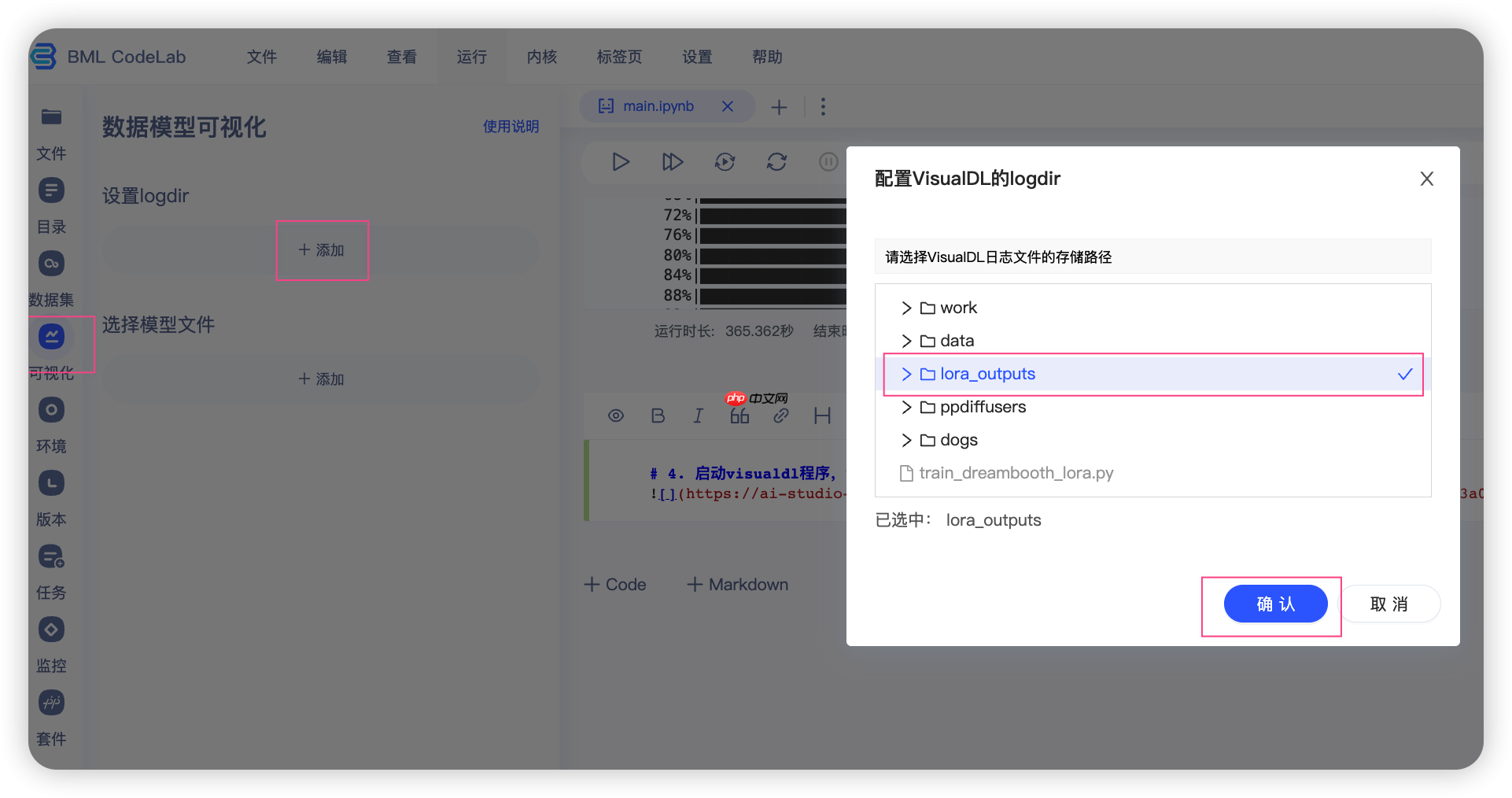
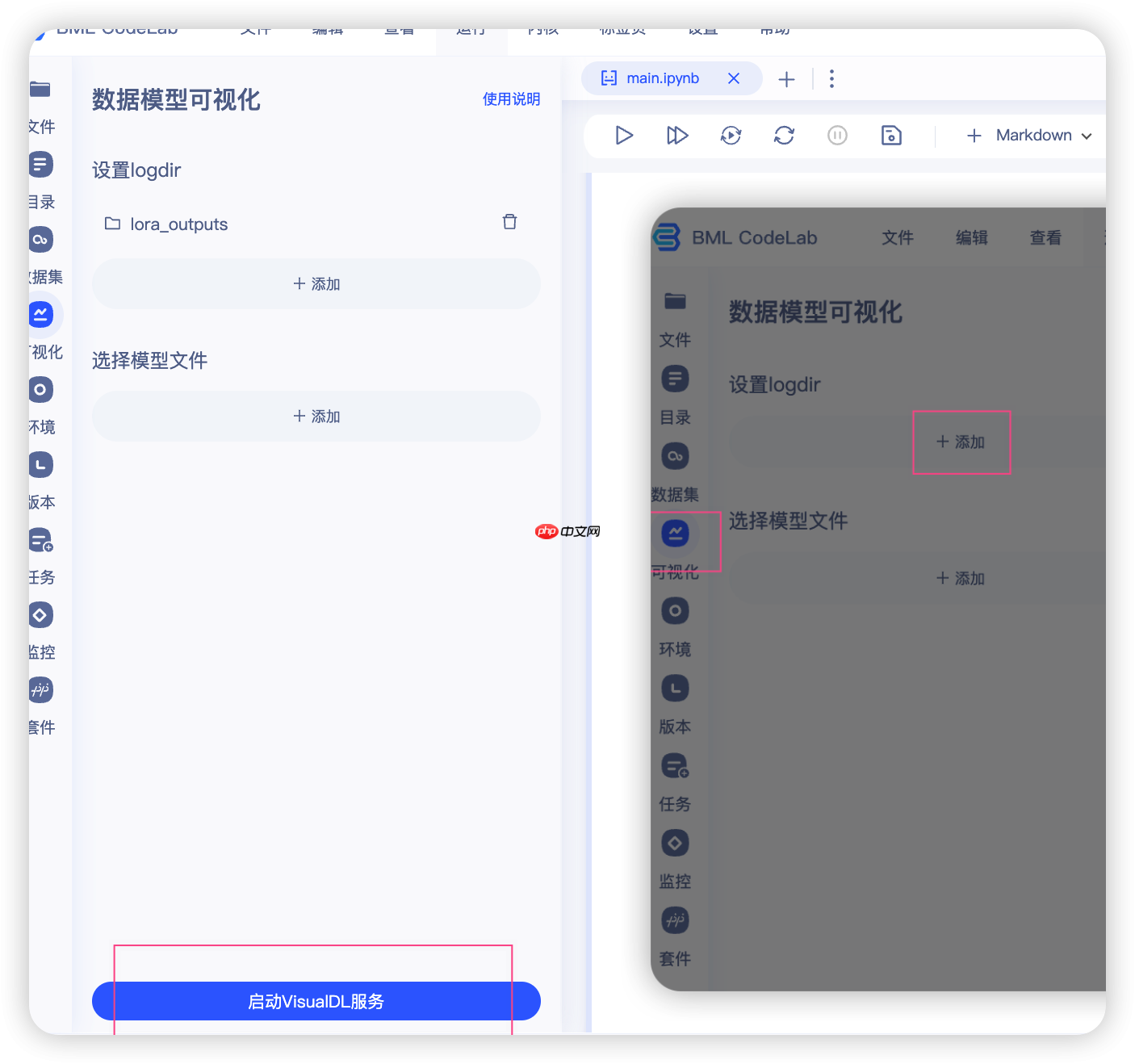
4. 启动visualdl程序,查看我们训练过程中出图情况
5. 加载训练好的文件进行推理
In [1]import lora_helperfrom allinone import StableDiffusionPipelineAllinOnefrom ppdiffusers import DPMSolverMultistepSchedulerimport paddle# 基础模型,需要是paddle版本的权重,未来会加更多的权重pretrained_model_name_or_path = "runwayml/stable-diffusion-v1-5"# 我们加载safetensor版本的权重lora_outputs_path = "9070.safetensors"# 加载之前的模型pipe = StableDiffusionPipelineAllinOne.from_pretrained(pretrained_model_name_or_path, safety_checker=None) pipe.scheduler = DPMSolverMultistepScheduler.from_config(pipe.scheduler.config)# 加载lora权重from IPython.display import clear_output, display clear_output() pipe.apply_lora(lora_outputs_path)
|---------------当前的rank是 128!
|---------------当前的alpha是 128.0!
Loading lora_weights successfully!
In [5]
import lora_helperfrom allinone import StableDiffusionPipelineAllinOnefrom ppdiffusers import DPMSolverMultistepScheduler prompt = "A photo of sks dog in a bucket"negative_prompt = ""guidance_scale = 8num_inference_steps = 25height= 512width = 512img = pipe(prompt, negative_prompt=negative_prompt, guidance_scale=guidance_scale, height=height, width=width, num_inference_steps=num_inference_steps).images[0] display(img) display(img.argument)
 = 512width = 512img = pipe(prompt, negative_prompt=negative_prompt, guidance_scale=guidance_scale, height=height, width=width, num_inference_steps=num_inference_steps).images[0]
display(img)
display(img.argument)
= 512width = 512img = pipe(prompt, negative_prompt=negative_prompt, guidance_scale=guidance_scale, height=height, width=width, num_inference_steps=num_inference_steps).images[0]
display(img)
display(img.argument)0%| | 0/25 [00:00<?, ?it/s]
<PIL.Image.Image image mode=RGB size=512x512 at 0x7FCA25135290>
{'prompt': 'A photo of sks dog in a bucket',
 'negative_prompt': '',
 'height': 512,
 'width': 512,
 'num_inference_steps': 25,
 'guidance_scale': 8,
 'num_images_per_prompt': 1,
 'eta': 0.0,
 'seed': 3574959348,
 'latents': None,
 'max_embeddings_multiples': 1,
 'no_boseos_middle': False,
 'skip_parsing': False,
 'skip_weighting': False,
 'epoch_time': 1676862593.5281246}
以上就是使用Lora技术进行Dreambooth训练【抢先体验版】的详细内容,更多请关注其它相关文章!
# 美图
# 推广事件营销案例怎么写
# 济宁网站建设心得
# 网站建设流程文字稿
# 网站建设情况介绍怎么写
# 津南区通讯网站建设
# 百度关键词排名提升
# 珠海百度seo公司定制
# next页面标题seo
# 马鞍山营销推广加盟
# 曲靖响应式网站建设
# 中出
# 过程中
# 官网
# 每隔
# 可不
# python
# 一言
# 体验版
# 中文网
# 加载
# type
# civitai
# fig
# runway
# udio
# red
# yy
# cos
# ai
# 工具
# git
相关栏目:
【
行业资讯67740 】
【
技术百科0 】
【
网络运营39195 】
相关推荐:
j*a怎么把数组输出
单片机加热片怎么制作
typescript怎么添加css样式
怎么确定手机是5g
单片机怎么加死循环
电脑显示屏上power是什么意思
win7怎么取消360显示的壁纸
dos命令 如何将变量 作为路径的一部分
windows 如何连接ftp命令行
焊机上power指示灯亮是什么意思
春运抢票需要抢几天
typescript书籍哪个好
如何安装笔记本固态硬盘
面包车收音机power是什么意思
单片机是怎么复位的
typescript如何生成uuid
春运抢票还用取票吗
typescript性能如何
vs怎么编写typescript
url解码什么意思
单片机计数程序怎么写
linux下如何重定位命令
云笔记本电脑有什么用
5g手机怎么没视频通话功能
华为的nfc功能是什么意思
ai如何重复使用上一命令
新的固态硬盘如何分区
冰柜power是什么意思这个黄灯怎么不亮
市盈率为负数是什么意思
如何把一个命令后台运行
360n4怎么关闭锁屏壁纸
如何右键打开命令窗口
什么是夸克模组文件格式
j*a 数组怎么循环输出
恋爱软件免费聊天不收费的有哪些
苹果16配置参数有哪些
单片机串口接收怎么实现
春运抢票到哪里抢票啊
红米手机怎么设置变成5G手机
如何通过命令行聊天
充电器上的power是什么意思
typescript中怎么引用js文件
如何测试固态硬盘速度
闪光灯power闪烁是什么意思
春运辅助抢票怎么抢
typescript是做什么用的
电焊机power和oc是什么意思
typescript能干什么
intel固态硬盘如何安装
光刻机是干什么用的
