






新闻中心 
2025 黑客松获奖作品:基于OpenVINO与PaddleOCR的输出抄表器
 2025-07-16
 浏览次数:次
 返回列表
返回列表本文介绍一种无需额外训练的自动化抄表方案,通过人工智能技术解决人工抄表费事、易出错的问题。该方案先配置图片屏幕区域坐标并预处理,再配置待识别元素坐标并裁剪,利用OpenVINO加载PaddleOCR模型识别文字,经结构化输出与后处理得到结果,无需大量贴合业务场景的数据集,适用于内容为文字的规整“表”。
☞☞☞AI 智能聊天, 问答助手, AI 智能搜索, 免费无限量使用 DeepSeek R1 模型☜☜☜
背景介绍
“表”是生活中的随处可见的一种设备。常见的“表”包括了家用电表,水表等设备;除此之外,还有工频场强计等“表”。受制于由于受到区域因素以及技术因素的制约,并非每种“表”都能够进行数据的自动采集,从而只能通过人工手动抄表。这种数据采集工作一方面较为费事和枯燥,另一方面,长时间工作带来的会导致工作人员疲劳,从而产生抄录错误。通过人工智能技术构造自动化的抄表流程能够极大的克服上述问题,提高工作效率。
相关工作
迄今为止,已经有许多关于电表读数的优秀项目出现,这些项目大都依赖于对特定场景的模型训练(包括微调)。
例如:
- 【PaddlePaddle+OpenVINO】电表检测识别模型的部署
- OpenVINO meter reader
但对于抄表工作的业务场景而言,具有以下特点:
- 无法准备大量的彻底贴合业务场景的数据集。
- 待抄录的“表”中的内容是文字,而非进度条或仪表盘
- 基于开放数据训练得到的OCR模型能够识别到“表”中的内容
因而,对于一些较为规整的“表”,我们完全可以基于开源OCR模型进行零微调的抄表工作。
技术方案
本项目提供了有一种无需额外训练的抄表器,只需要人为指定一些和布局有关的配置信息,即可实现表中数据的记录。总体流程如下:
- 配置图片中屏幕区域的坐标值。(这些坐标值也可以通过cv2的拐点检测或深度学习进行获取)
- 对图片进行预处理(仿射变换)
- 配置待识别的元素对应的坐标,并裁剪对应的区域。
- 如有需要,可以对裁剪下来的区域进行预处理。
- 基于OpenVINO进行文字识别。
- 结构化输出信息
- 如有需要,对输出结果进行进一步精炼。

目录
- 背景介绍
- 图片预处理
- 基于OpenVINO加载PaddleOCR识别模型进行预测
- 结构化输出与后处理
图片预处理
由于本项目是一个零微调的项目,因此,为了保证识别模型的有效性,需要人工对齐输入信息。
- 修正倾斜的图片,将图片中的屏幕区域修正到指定的大小
- 根据从说明书等地方获取到的设备信息,设定待识别的区域在屏幕上的布局。
修正图片
以下列图片为例,本节展示如何将图片从倾斜的状态,修正为正面观众的状态。
 In [3]
# 配置坐标信息# The coordinates of the corners of the screen in case 1POINTS = [[1121, 56],    # Left top
          [3242, 183],   # right top
          [3040, 1841],  # right bottom
          [1000, 1543]]   # left bottom# The size of the screen in case 1DESIGN_SHAPE = (1300, 1000)
In [5]
import cv2
import numpy as np# 定义仿射变换函数def pre_processing(img, point_list, target_shape):
    """
    Preprocessing function for normalizing skewed images.
    Parameters:
        img (np.ndarray): Input image.
        point_list (List[List[int, int], List[int, int], List[int, int]]): Coordinates of the corners of the screen.
        target_shape (Tuple(int, int)): The design shape.
    """

    # affine transformations
    # point list is the coordinates of the corners of the screen
    # target shape is the design shape

    target_w, target_h = target_shape
    pts1 = np.float32(point_list)
    pts2 = np.float32([[0, 0],[target_w,0],[target_w, target_h],[0,target_h]])

    M = cv2.getPerspectiveTransform(pts1, pts2)
    img2 = cv2.warpPerspective(img, M, (target_w,target_h))    return img2
In [6]
import matplotlib.pyplot as plt# 执行预处理img = cv2.imread('example1.jpg')# affine transformations to normalize skewed imagesimg = pre_processing(img, POINTS, DESIGN_SHAPE)# The screen part is cropped and correctedplt.imshow(img)<matplotlib.image.AxesImage at 0x7fa87a3e9510>
<Figure size 640x480 with 1 Axes>
基于OpenVINO加载PaddleOCR识别模型进行预测
文字识别模型(PaddleOCR)
PaddleOCR 是PaddlePaddle的文字识别套件。迄今为止,PaddleOCR已经提供了许多复用性强的预训练模型。在本项目中使用的预训练模型是Chinese and English ultra-lightweight PP-OCR model (9.4M)。更多的信息请参考PaddleOCR Github或PaddleOCR Gitee。
一个标准的OCR流程包括了文字检测和文字识别,对于本项目来说,文字检测工作已经通过人工配置的方式解决了,因此,只需要进行文字识别即可。
 美图云修
美图云修
商业级AI影像处理工具
 50
查看详情
50
查看详情

OpenVINO简介
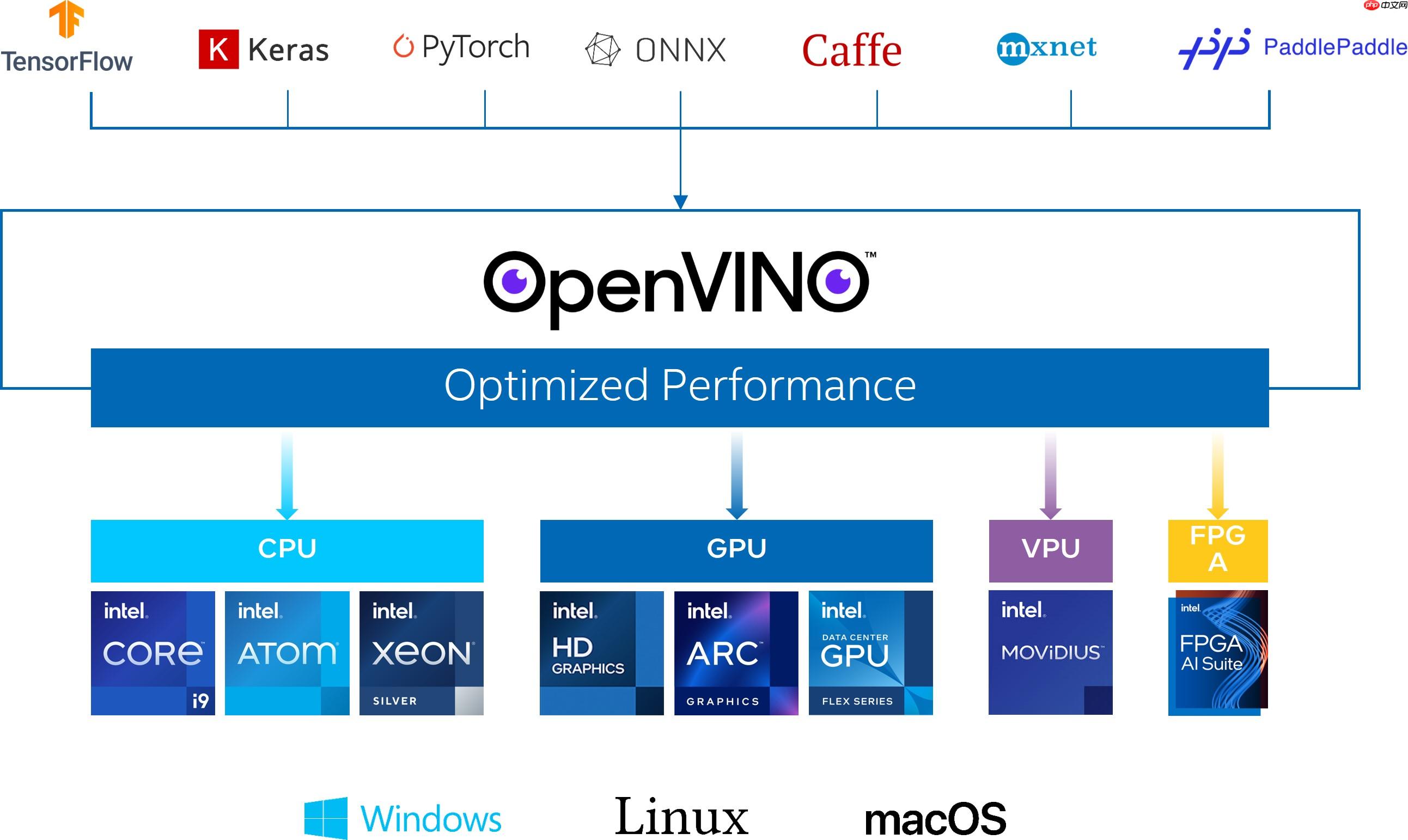
OpenVINO作为Intel原生的深度学习推理框架,可以最大化的提升人工智能神经网络在Intel平台上的执行性能,实现一次编写,任意部署的开发体验。OpenVINO在2025.1版本后,就可以直接支持飞桨模型,大大提升了模型在Intel异构硬件上的推理性能与部署便捷性,带来更高的生产效率,更广阔的兼容性以及推理性能的优化。
获取模型
In [ ]! wget "https://paddleocr.bj.bcebos.com/PP-OCRv3/chinese/ch_PP-OCRv3_rec_infer.tar"! tar -xvf ch_PP-OCRv3_rec_infer.tar
基于OpenVINO加载PaddleOCR
使用OpenVINO加载Paddle模型无需经过任何转换,只需要
- 创建环境
- 读取模型
- 生成推理接口
! pip install openvinoIn [11]
from openvino.runtime import Core# Initialize OpenVINO Runtime for text recognition.core = Core()# Read the model and corresponding weights from a file.rec_model_file_path = "ch_PP-OCRv3_rec_infer/inference.pdmodel"rec_model = core.read_model(model=rec_model_file_path)# Assign dynamic shapes to every input layer on the last dimension.for input_layer in rec_model.inputs:
    input_shape = input_layer.partial_shape
    input_shape[3] = -1
    rec_model.reshape({input_layer: input_shape})

rec_compiled_model = core.compile_model(model=rec_model, device_name="CPU")# Get input and output nodes.rec_input_layer = rec_compiled_model.input(0)
rec_output_layer = rec_compiled_model.output(0)
文字识别
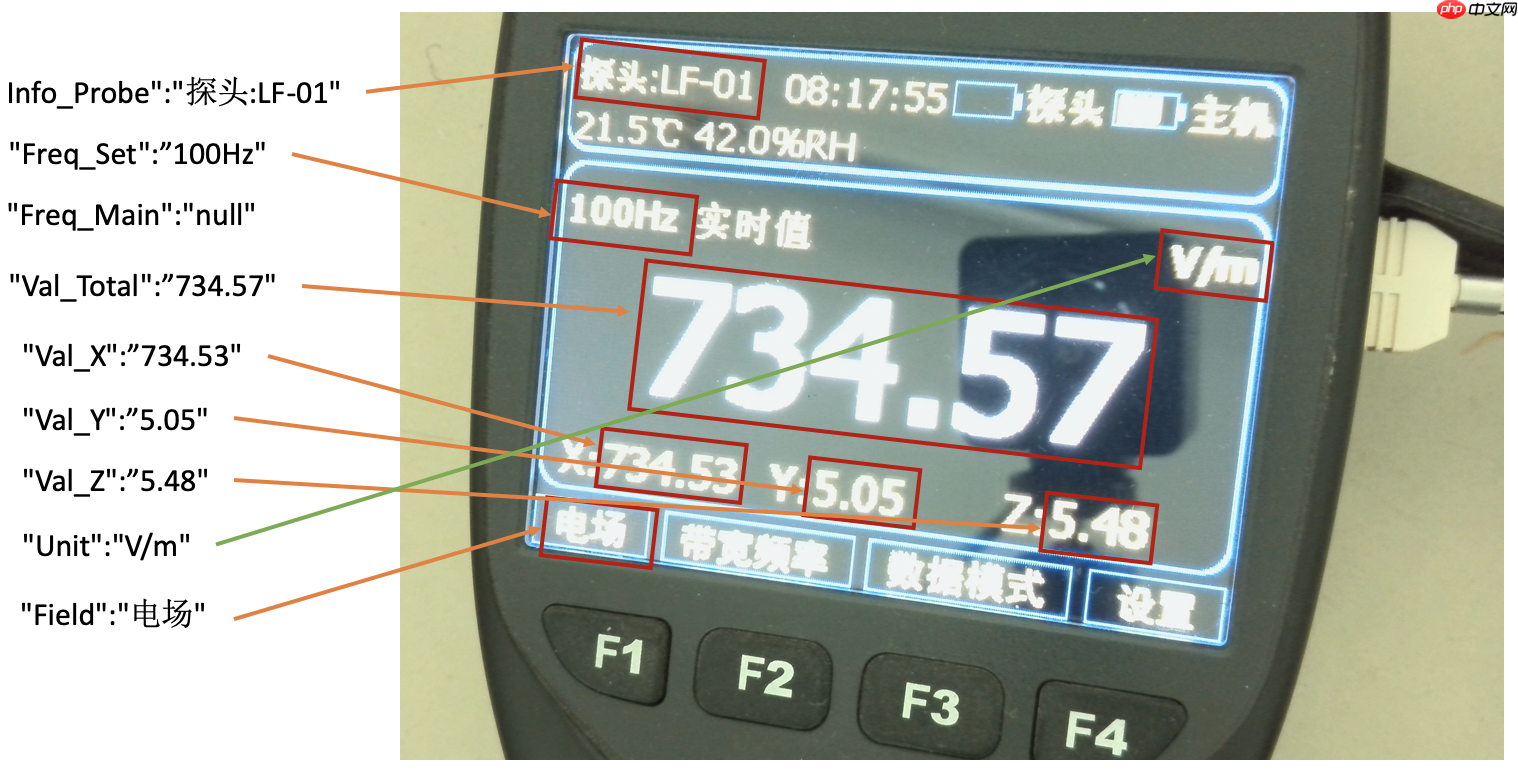
依旧对于上述示例图片,希望结构化输出以下内容:[{"Info_Probe":""}, {"Freq_Set":""}, {"Freq_Main":""}, {"Val_Total":""},{"Val_X":""}, {"Val_Y":""}, {"Val_Z":""}, {"Unit":""}, {"Field":""}]。输出示例如下图所示:
配置布局
首先,需要基于仿射变换的结果,配置各个元素在图片上的布局。这个配置对于同一批表来说是固定的。
In [13]# features and layout informationDESIGN_LAYOUT = {'Info_Probe':[14, 36, 410, 135], # feature_name, xmin, ymin, xmax, ymax
'Freq_Set':[5, 290, 544, 406],
'Val_Total':[52, 419, 1256, 741],
'Val_X':[19, 774, 433, 882],
'Val_Y':[433, 773, 874, 884],
'Val_Z':[873, 773, 1276, 883],
'Unit':[1064, 291, 1295, 403],
'Field':[5, 913, 243, 998]}
文字识别的预处理函数
In [18]import copyimport math# Preprocess for text recognition.def resize_norm_img(img, max_wh_ratio):
"""
Resize input image for text recognition
Parameters:
img: image with bounding box from text detection
max_wh_ratio: ratio of image scaling
"""
rec_image_shape = [3, 48, 320]
imgC, imgH, imgW = rec_image_shape assert imgC == img.shape[2]
character_type = "ch"
if character_type == "ch":
imgW = int((32 * max_wh_ratio))
h, w = img.shape[:2]
ratio = w / float(h) if math.ceil(imgH * ratio) > imgW:
resized_w = imgW else:
resized_w = int(math.ceil(imgH * ratio))
resized_image = cv2.resize(img, (resized_w, imgH))
resized_image = resized_image.astype('float32')
resized_image = resized_image.transpose((2, 0, 1)) / 255
resized_image -= 0.5
resized_image /= 0.5
padding_im = np.zeros((imgC, imgH, imgW), dtype=np.float32)
padding_im[:, :, 0:resized_w] = resized_image return padding_imdef get_rotate_crop_image(img, points):
'''
img_height, img_width = img.shape[0:2]
left = int(np.min(points[:, 0]))
right = int(np.max(points[:, 0]))
top = int(np.min(points[:, 1]))
bottom = int(np.max(points[:, 1]))
img_crop = img[top:bottom, left:right, :].copy()
points[:, 0] = points[:, 0] - left
points[:, 1] = points[:, 1] - top
'''
assert len(points) == 4, "shape of points must be 4*2"
img_crop_width = int( max(
np.linalg.norm(points[0] - points[1]),
np.linalg.norm(points[2] - points[3])))
img_crop_height = int( max(
np.linalg.norm(points[0] - points[3]),
np.linalg.norm(points[1] - points[2])))
pts_std = np.float32([[0, 0], [img_crop_width, 0],
[img_crop_width, img_crop_height],
[0, img_crop_height]])
M = cv2.getPerspectiveTransform(points, pts_std)
dst_img = cv2.warpPerspective(
img,
M, (img_crop_width, img_crop_height),
borderMode=cv2.BORDER_REPLICATE,
flags=cv2.INTER_CUBIC)
dst_img_height, dst_img_width = dst_img.shape[0:2] if dst_img_height * 1.0 / dst_img_width >= 1.5:
dst_img = np.rot90(dst_img) return dst_imgdef prep_for_rec(dt_boxes, frame):
"""
Preprocessing of the detected bounding boxes for text recognition
Parameters:
dt_boxes: detected bounding boxes from text detection
frame: original input frame
"""
ori_im = frame.copy()
img_crop_list = []
for bno in range(len(dt_boxes)):
tmp_box = copy.deepcopy(dt_boxes[bno])
img_crop = get_rotate_crop_image(ori_im, tmp_box)
img_crop_list.append(img_crop)
img_num = len(img_crop_list) # Calculate the aspect ratio of all text bars.
width_list = [] for img in img_crop_list:
width_list.append(img.shape[1] / float(img.shape[0]))
# Sorting can speed up the recognition process.
indices = np.argsort(np.array(width_list)) return img_crop_list, img_num, indicesdef batch_text_box(img_crop_list, img_num, indices, beg_img_no, batch_num):
"""
Batch for text recognition
Parameters:
img_crop_list: processed bounding box images with detected bounding box
img_num: number of bounding boxes from text detection
indices: sorting for bounding boxes to speed up text recognition
beg_img_no: the beginning number of bounding boxes for each batch of text recognition inference
batch_num: number of images in each batch
"""
norm_img_batch = []
max_wh_ratio = 0
end_img_no = min(img_num, beg_img_no + batch_num) for ino in range(beg_img_no, end_img_no):
h, w = img_crop_list[indices[ino]].shape[0:2]
wh_ratio = w * 1.0 / h
max_wh_ratio = max(max_wh_ratio, wh_ratio) for ino in range(beg_img_no, end_img_no):
norm_img = resize_norm_img(img_crop_list[indices[ino]], max_wh_ratio)
norm_img = norm_img[np.newaxis, :]
norm_img_batch.append(norm_img)
norm_img_batch = np.concatenate(norm_img_batch)
norm_img_batch = norm_img_batch.copy() return norm_img_batch
文字识别的后处理函数
用于将文字识别的结果进行解码,转化为汉字
In [21]class RecLabelDecode(object):
""" Convert between text-label and text-index """
def __init__(self,
character_dict_path=None,
character_type='ch',
use_space_char=False):
support_character_type = [ 'ch', 'en', 'EN_symbol', 'french', 'german', 'japan', 'korean', 'it', 'xi', 'pu', 'ru', 'ar', 'ta', 'ug', 'fa', 'ur', 'rs', 'oc', 'rsc', 'bg', 'uk', 'be', 'te', 'ka', 'chinese_cht', 'hi', 'mr', 'ne', 'EN', 'latin', 'arabic', 'cyrillic', 'devanagari'
] assert character_type in support_character_type, "Only {} are supported now but get {}".format(
support_character_type, character_type)
self.beg_str = "sos"
self.end_str = "eos"
if character_type == "en":
self.character_str = "0123456789abcdefghijklmnopqrstuvwxyz"
dict_character = list(self.character_str) elif character_type == "EN_symbol": # same with ASTER setting (use 94 char).
self.character_str = string.printable[:-6]
dict_character = list(self.character_str) elif character_type in support_character_type:
self.character_str = [] assert character_dict_path is not None, "character_dict_path should not be None when character_type is {}".format(
character_type) with open(character_dict_path, "rb") as fin:
lines = fin.readlines() for line in lines:
line = line.decode('utf-8').strip("\n").strip("\r\n")
self.character_str.append(line) if use_space_char:
self.character_str.append(" ")
dict_character = list(self.character_str) else: raise NotImplementedError
self.character_type = character_type
dict_character = self.add_special_char(dict_character)
self.dict = {} for i, char in enumerate(dict_character):
self.dict[char] = i
self.character = dict_character
def __call__(self, preds, label=None, *args, **kwargs):
preds_idx = preds.argmax(axis=2)
preds_prob = preds.max(axis=2)
text = self.decode(preds_idx, preds_prob, is_remove_duplicate=True) if label is None: return text
label = self.decode(label) return text, label
def add_special_char(self, dict_character):
dict_character = ['blank'] + dict_character return dict_character
def decode(self, text_index, text_prob=None, is_remove_duplicate=False):
""" convert text-index into text-label. """
result_list = []
ignored_tokens = self.get_ignored_tokens()
batch_size = len(text_index) for batch_idx in range(batch_size):
char_list = []
conf_list = [] for idx in range(len(text_index[batch_idx])): if text_index[batch_idx][idx] in ignored_tokens: continue
if is_remove_duplicate: # only for predict
if idx > 0 and text_index[batch_idx][idx - 1] == text_index[
batch_idx][idx]: continue
char_list.append(self.character[int(text_index[batch_idx][
idx])]) if text_prob is not None:
conf_list.append(text_prob[batch_idx][idx]) else:
conf_list.append(1)
text = ''.join(char_list)
result_list.append((text, np.mean(conf_list))) return result_list
def get_ignored_tokens(self):
return [0] # for ctc blank# Since the recognition results contain chinese words, we should use 'ch' as character_typete xt_decoder = RecLabelDecode(character_dict_path="ppocr_keys_v1.txt",
character_type='ch',
use_space_char=True)
xt_decoder = RecLabelDecode(character_dict_path="ppocr_keys_v1.txt",
character_type='ch',
use_space_char=True)
 xt_decoder = RecLabelDecode(character_dict_path="ppocr_keys_v1.txt",
character_type='ch',
use_space_char=True)
xt_decoder = RecLabelDecode(character_dict_path="ppocr_keys_v1.txt",
character_type='ch',
use_space_char=True)基于OpenVINO进行文字识别
下面以Freq_Set为例,进行文字识别
In [25]# 输出结构体struct_result = {}
# Crop imgs according the layout informationxmin, ymin, xmax, ymax = DESIGN_LAYOUT['Freq_Set']
crop_img = img[ymin:ymax, xmin:xmax]
h = ymax - ymin # height of crop_imgw = xmax - xmin # width of crop_imgdt_boxes = [np.array([[0,0],[w,0],[w,h],[0,h]],dtype='float32')]
batch_num = 1# since the input img is cropped, we do not need a detection model to find the position of texts# Preprocess detection results for recognition.img_crop_list, img_num, indices = prep_for_rec(dt_boxes, crop_img)# txts are the recognized text resultsrec_res = [['', 0.0]] * img_num
txts = []
for beg_img_no in range(0, img_num): # Recognition starts from here.
norm_img_batch = batch_text_box(
img_crop_list, img_num, indices, beg_img_no, batch_num) # Run inference for text recognition.
rec_results = rec_compiled_model([norm_img_batch])[rec_output_layer] # Postprocessing recognition results.
rec_result = text_decoder(rec_results) for rno in range(len(rec_result)):
rec_res[indices[beg_img_no + rno]] = rec_result[rno]
if rec_res:
txts = [rec_res[i][0] for i in range(len(rec_res))]
# record the recognition resultstruct_result['Freq_Set'] = txts[0]print(txts[0])100H2实时值
结构化输出与后处理
上面的逻辑已经完成了使用OpenVINO加载PaddleOCR并进行预测,但实际上由于整个模型没有进行微调,所以对于当前的业务场景来说可能不够完美,这个时候可以通过一些简单的逻辑进行处理,比如,对于示例图片中,H2必然是不存在的,这个地方可以直接通过replace替换为HZ。
简单来说,对于示例图片的这种表,可以定义如下后处理函数:
In [28]# Post-processing, fix some error made in recognitiondef post_processing(results, post_configration):
"""
Postprocessing function for correcting the recognition errors.
Parameters:
results (Dict): The result directory.
post_configration (Dict): The configuration directory.
"""
for key in results.keys(): if len(post_configration[key]) == 0: continue # nothing to do
for post_item in post_configration[key]:
key_word = post_item[0] if key_word == 'MP': # mapping
source_word = post_item[1]
target_word = post_item[2] if source_word in results[key]:
results[key] = target_word elif key_word == 'RP': # removing
source_word = post_item[1]
target_word = post_item[2]
results[key] = results[key].replace(source_word, target_word) elif key_word == 'AD': # add point
add_position = post_item[1]
results[key] = results[key][:add_position] + '.' + results[key][add_position:] return results# 通过配置决定如何进行后处理# Congiguration for postprocessing of the resultsRESULT_POST = {"Info_Probe":[['MP', 'LF', '探头:LF-01']], # words need to be mapped
"Freq_Set":[['RP', '实时值', ''], ['RP', ' ', ''], ['RP', 'H2', 'HZ']], # words need to be replace
"Val_Total":[['RP', 'H2', 'Hz']], "Val_X":[['RP', 'X', ''], ['RP', ':', '']],
"Val_Y":[['RP', 'Y', ''], ['RP', ':', '']],
"Val_Z":[['RP', 'Z', ''], ['RP', ':', '']],
"Unit":[['MP', 'T', 'μT'],['MP', 'kV', 'kV/m'],['MP', 'kv', 'kV/m'],['MP', 'vm', 'V/m'],['MP', 'Vm', 'V/m'],['MP', 'A', 'A/m']],
"Field":[]} # nothing need to do# Postprocessing, to fix some error made in recognitionstruct_result = post_processing(struct_result, RESULT_POST)# Print resultprint(struct_result){'Freq_Set': '100HZ'}
全流程一键运行
为了方便运行,这里也提供了一个封装好的函数
In [32]# 为了避免因为图片模糊导致的漏检,配置一个输出模板,从而让每个图片输出格式都一致# Output template in case 1RESULT_TEMP = {"Info_Probe":"探头:---",
"Freq_Set":"",
"Val_Total":"无探头",
"Val_X":"",
"Val_Y":"",
"Val_Z":"",
"Unit":"A/m",
"Field":"常规"}
In [33]
# the input of recognition should be image, DESIGN information, compiled_modeldef main_function(img, DESIGN_LAYOUT, RESULT_TEMP, preprocess_function=None):
    """
    Main program of processing the meter.
    Parameters:
        img (np.ndarray): Input image.
        DESIGN_LAYOUT (Dict): The coordinates of elements in the screen.
        RESULT_TEMP (Dict): The template for structure output.
        preprocess_function: The preprocess function for cropped images, `None` means no preprocessing to do.
    """
    # copy the structure output template
    struct_result = copy.deepcopy(RESULT_TEMP)    # structure recognition begins here
    for key in DESIGN_LAYOUT.keys():        # Crop imgs according the layout information
        xmin, ymin, xmax, ymax = DESIGN_LAYOUT[key]
        crop_img = img[ymin:ymax, xmin:xmax]
        # preprocessing for cropped images
        if preprocess_function is not None:
            crop_img = preprocess_function(crop_img)

        h = ymax - ymin  # height of crop_img
        w = xmax - xmin  # width of crop_img
        dt_boxes = [np.array([[0,0],[w,0],[w,h],[0,h]],dtype='float32')]
        batch_num = 1

        # since the input img is cropped, we do not need a detection model to find the position of texts
        # Preprocess detection results for recognition.
        img_crop_list, img_num, indices = prep_for_rec(dt_boxes, crop_img)        # txts are the recognized text results
        rec_res = [['', 0.0]] * img_num
        txts = []

        for beg_img_no in range(0, img_num):            # Recognition starts from here.
            norm_img_batch = batch_text_box(
                img_crop_list, img_num, indices, beg_img_no, batch_num)            # Run inference for text recognition.
            rec_results = rec_compiled_model([norm_img_batch])[rec_output_layer]            # Postprocessing recognition results.
            rec_result = text_decoder(rec_results)            for rno in range(len(rec_result)):
                rec_res[indices[beg_img_no + rno]] = rec_result[rno]
            if rec_res:
                txts = [rec_res[i][0] for i in range(len(rec_res))]

        # record the recognition result
        struct_result[key] = txts[0]
    return struct_result
In [34]
img = cv2.imread('example1.jpg')# affine transformations to normalize skewed imagesimg = pre_processing(img, POINTS, DESIGN_SHAPE)

struct_result = main_function(img, DESIGN_LAYOUT, RESULT_TEMP)# Postprocessing, to fix some error made in recognitionstruct_result = post_processing(struct_result, RESULT_POST)# Print resultprint(struct_result)
{'Info_Probe': '探头:LF-01', 'Freq_Set': '100HZ', 'Val_Total': '734.57', 'Val_X': '734.53', 'Val_Y': '5.05', 'Val_Z': '5.48', 'Unit': 'V/m', 'Field': '电场'}
以上就是2025 黑客松获奖作品:基于OpenVINO与PaddleOCR的输出抄表器的详细内容,更多请关注其它相关文章!
# ai
# 内江品牌网站建设
# 海南短视频营销推广技巧
# 深圳信息网站优化多少钱
# 烟草营销推广公司
# 免费上站推广网站
# 阜宁网站seo优化方案
# 吐鲁番百度seo优化
# 运动鞋网络营销推广策略
# 为例
# 如有
# 一键
# 只需要
# 美图
# 结构化
# 加载
# 后处理
# 中文网
# 抄表
# type
# warp
# fig
# design
# red
# git
# 宁波奉化抖音推广运营营销
# 电商引流与推广营销
相关栏目:
【
行业资讯67740 】
【
技术百科0 】
【
网络运营39195 】
相关推荐:
尼桑越野车中控前power是什么意思
oppo手机nfc功能是什么意思
光刻机的作用及工作原理
8800日元等于多少人民币
如何看固态硬盘信息
三星 nfc什么功能是什么意思
品道音响上的power键是什么意思
如何利用固态硬盘
苹果手机16新款颜色有哪些
如何更新typescript
j*a怎么让数组倒换
j*a怎么清除数组
联想的固态硬盘如何
如何设置sql命令
如何更新苹果ios16
如何右键打开命令窗口
如何选购ssd固态硬盘
j*a对数组怎么使用
基金市盈率是什么意思
typescript怎么设置滚动条
春运车站抢票和网上抢票
element ui是什么
三星相机里power是什么意思
sqlite中datediff函数怎么用 SQLite中DATEDIFF()函数的用法分享
typescript多久能学会
如果公司ttm市盈率为负数是什么意思
win10如何打开dos命令窗口大小
移动固态硬盘如何使用
充电器上的power是什么意思
固态硬盘颗粒如何修理
怎么在typescript写原型链
typescript为什么能运行
put linux命令如何书写
电信开通nfc功能是什么意思
镜像ao3链接入口
光刻机是干什么用的
电脑显示屏上power是什么意思
bc是什么意思
typescript干什么的
300秒等于多少分钟
多少毫安的充电宝可以带上飞机
路由器power闪红绿灯闪是什么意思
征信不好如何恢复正常 征信不好要怎么样才能恢复正常教程
drawing是什么意思
如何辨别固态硬盘坏块
夸克高考为什么不靠谱
sql isnull函数如何使用
夸克加载什么要会员
typescript是什么时候出来的
自由服务器如何做动态ip域名解析
