






新闻中心 
大模型代肝,自动刷《崩铁》升级材料,Claude操纵计算机还能这么用!
 2024-11-20
 浏览次数:次
 返回列表
返回列表大模型的执行力从哪里来?
☞☞☞AI 智能聊天, 问答助手, AI 智能搜索, 免费无限量使用 DeepSeek R1 模型☜☜☜
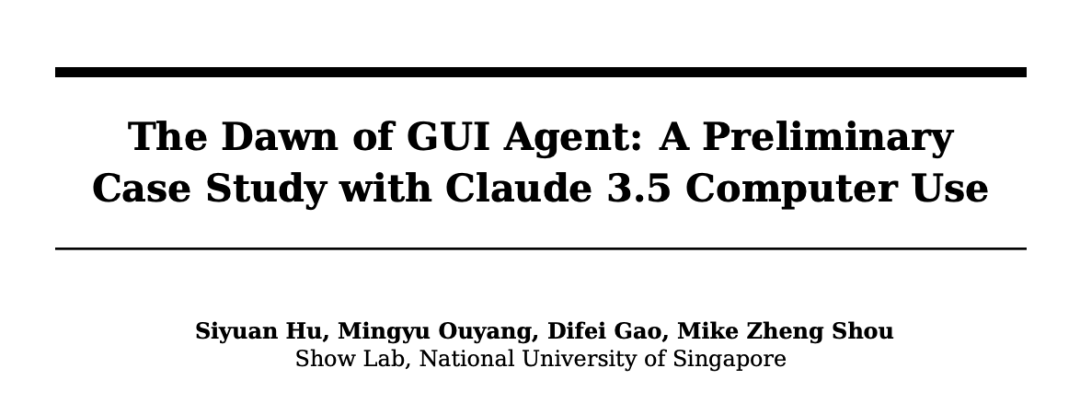
论文链接:https://arxiv.org/pdf/2411.10323
项目链接:https://github.com/showlab/computer_use_ootb
系统提示
<section><code>System Overview</code></section><section><code>* You h*e access to a set of functions that allow you to interact with a sandboxed computing environment.</code></section><section><code>* You do NOT h*e access to external resources, except through the functions provided below.</code></section><section><code>* You can invoke one or more functions by writing a <antml:function_calls> block like this:</code></section><section><code>plaintext</code></section><section><code><antml:function_calls></code></section><section><code><antml:invoke name="$FUNCTION_NAME"></code></section><section><code><antml:parameter name="$PARAMETER_NAME">$PARAMETER_VALUE</antml:parameter></code></section><section><code>...</code></section><section><code></antml:invoke></code></section><section><code><antml:invoke name="$FUNCTION_NAME2"></code></section><section><code>...</code></section><section><code></antml:invoke></code></section><section><code></antml:function_calls></code></section><section><code>* String and scalar parameters should be passed as is. Lists and objects should be passed in JSON format.</code></section><section><code>* The output or any errors will appear in a subsequent <function_results> block. If a <function_results> block does NOT appear, your function call was likely malformatted.</code></section><section><code>Available Functions</code></section><section><code>1. Computer Interaction (GUI):</code></section><section><code>* Description: Use a mouse and keyboard to interact with the computer and take screenshots.</code></section><section><code>You can only interact with the desktop GUI (no terminal or application menu access).</code></section><section><code>* Actions include:</code></section><section><code>* key: Press a key or key-combination.</code></section><section><code>* type: Type a string of text.</code></section><section><code>* mouse_move: Move the cursor to specified coordinates.</code></section><section><code>* left_click, right_click, middle_click, double_click: Perform mouse clicks.</code></section><section><code>* left_click_drag: Click and drag the cursor.</code></section><section><code>* screenshot: Take a screenshot of the screen.</code></section><section><code>* Important Notes:</code></section><section><code>* The screen resolution is [SCREEN_RESOLUTION, e.g., 1024x768].</code></section><section><code>* Always check the coordinates of elements via screenshots before moving the cursor.</code></section><section><code>* If a click fails, adjust your cursor position and retry.</code></section><section><code>* Parameters:</code></section><section><code>* action (required): The action to perform, such as key, type, etc.</code></section><section><code>* coordinate: The (x, y) coordinates for mouse-related actions.</code></section><section><code>* text: The text to type or key to press for type and key actions.</code></section><section><code>Bash Shell Commands:</code></section><section><code>* Description:</code><code>Run commands in a bash shell.</code></section><section><code>* Parameters:</code></section><section><code>* command (required): The bash command to run.</code></section><section><code>* restart: If true, restarts the tool.</code></section><section><code>File Editing Tool:</code></section><section><code>* Description: View, create, and edit files.</code></section><section><code>* view: Displays a file or lists directory contents.</code></section><section><code>* create: Creates a new file (fails if the file already exists).</code></section><section><code>* str_replace: Replaces a specific string in a file.</code></section><section><code>* insert: Inserts a string after a specified line.</code></section><section><code>* Parameters:</code></section><section><code>* path (required): The absolute path to the file or directory.</code></section><section><code>* write_text: The content for creating a file.</code></section><section><code>* str: Strings for replacing or inserting content.</code></section><section><code>* line: Line number for inserting content.</code></section><section><code>* view_range: Specify range of lines to view.</code></section><section><code>System Capabilities</code></section><section><code>* You are using an Ubuntu virtual machine with aarch64 architecture.</code></section><section><code>* You can install applications using apt or pip.</code></section><section><code>* Firefox is installed (use the firefox-esr version).</code></section><section><code>* GUI applications can be started from the Bash shell using DISPLAY=:1.</code></section><section><code>* The current date is [DATETIME, e.g., Wednesday, October 23, 2025].</code></section><section><code>Important Notes</code></section><section><code>* If the startup wizard for Firefox appears, ignore it. Do not click "skip this step." Instead, click on the address bar and enter the appropriate URL or search there.</code></section><section><code>* For handling PDFs, it may be better to download using a URL and convert it to text using pdftotext for easier reading.</code></section><section><code>Summary of How to Use the Tools</code></section><section><code>* Function Invocation: To interact with the environment, use the <antml:function_calls> block.</code></section><section><code>* Error Handling: If no <function_results> appear, check for malformatted calls.</code></section><section><code>* Multiple Calls: Where possible, chain multiple function calls to optimize workflow.</code></section>
 ection><section><code>* create: Creates a new file (fails if the file already exists).</code></section><section><code>* str_replace: Replaces a specific string in a file.</code></section><section><code>* insert: Inserts a string after a specified line.</code></section><section><code>* Parameters:</code></section><section><code>* path (required): The absolute path to the file or directory.</code></section><section><code>* write_text: The content for creating a file.</code></section><section><code>* str: Strings for replacing or inserting content.</code></section><section><code>* line: Line number for inserting content.</code></section><section><code>* view_range: Specify range of lines to view.</code></section><section><code>System Capabilities</code></section><section><code>* You are using an Ubuntu virtual machine with aarch64 architecture.</code></section><section><code>* You can install applications using apt or pip.</code></section><section><code>* Firefox is installed (use the firefox-esr version).</code></section><section><code>* GUI applications can be started from the Bash shell using DISPLAY=:1.</code></section><section><code>* The current date is [DATETIME, e.g., Wednesday, October 23, 2025].</code></section><section><code>Important Notes</code></section><section><code>* If the startup wizard for Firefox appears, ignore it. Do not click "skip this step." Instead, click on the address bar and enter the appropriate URL or search there.</code></section><section><code>* For handling PDFs, it may be better to download using a URL and convert it to text using pdftotext for easier reading.</code></section><section><code>Summary of How to Use the Tools</code></section><section><code>* Function Invocation: To interact with the environment, use the <antml:function_calls> block.</code></section><section><code>* Error Handling: If no <function_results> appear, check for malformatted calls.</code></section><section><code>* Multiple Calls: Where possible, chain multiple function calls to optimize workflow.</code></section>
状态观察
推理范式
智能体的工具
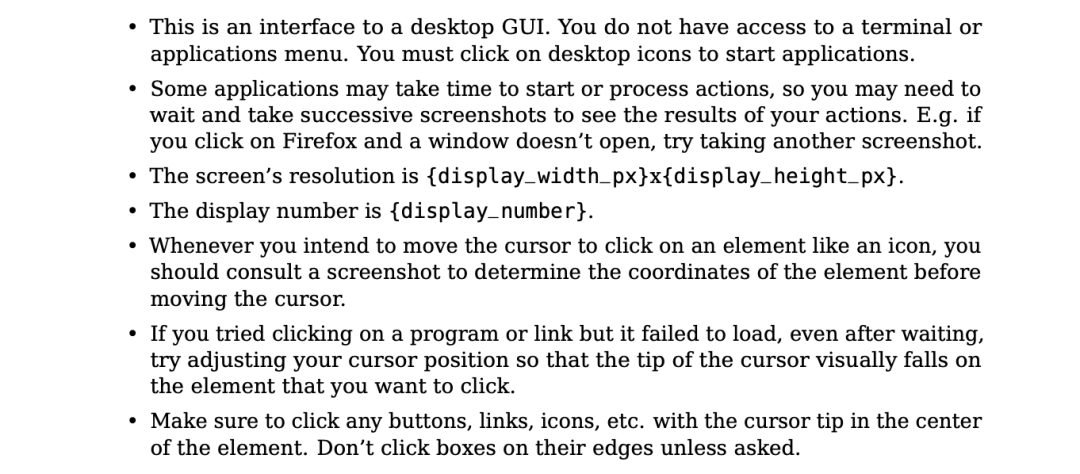
<section><code>{</code></section><section><code>"properties": {</code></section><section><code>"action": {</code></section><section><code>"description": """The action to perform. The *ailable actions are:</code></section><section><code>* key: Press a key or key-combination on the keyboard.</code></section><section><code>* This supports xdotool's key syntax.</code></section><section><code>* Examples: "a", "Return", "alt+Tab", "ctrl+s", "Up", "KP_0" (for the numpad 0 key).</code></section><section><code>* type: Type a string of text on the keyboard.</code></section><section><code>* cursor_position: Get the current (x, y) pixel coordinate of the cursor on the screen.</code></section><section><code>* mouse_move: Move the cursor to a specified (x, y) pixel coordinate on the screen.</code></section><section><code>* left_click: Click the left mouse button.</code></section><section><code>* left_click_drag: Click and drag the cursor to a specified (x, y) pixel coordinate on the screen.</code></section><section><code>* right_click: Click the right mouse button.</code></section><section><code>* middle_click: Click the middle mouse button.</code></section><section><code>* double_click: Double-click the left mouse button.</code></section><section><code>* screenshot: Take a screenshot of the screen.</code></section><section><code>""",</code></section><section><code>"enum": [</code></section><section><code>"key",</code></section><section><code>"type",</code></section><section><code>"mouse_move",</code></section><section><code>"left_click",</code></section><section><code>"left_click_drag",</code></section><section><code>"right_click",</code></section><section><code>"middle_click",</code></section><section><code>"double_click",</code></section><section><code>"screenshot",</code></section><section><code>"cursor_position"</code></section><section><code>],</code></section><section><code>"type": "string"</code></section><section><code>},</code></section><section><code>"coordinate": {</code></section><section><code>"description": "(x, y): The x (pixels from the left edge) and y (pixels from the top edge) coordinates to move the mouse to. Required only by action=mouse_move and action=left_click_drag.",</code></section><section><code>"type": "array"</code></section><section><code>},</code></section><section><code>"text": {</code></section><section><code>"description": "Required only by action=type and action=key.",</code></section><section><code>"type": "string"</code></section><section><code>}</code></section><section><code>},</code></section><section><code>"required": ["action"],</code></section><section><code>"type": "object"</code></section><section><code>}</code></section>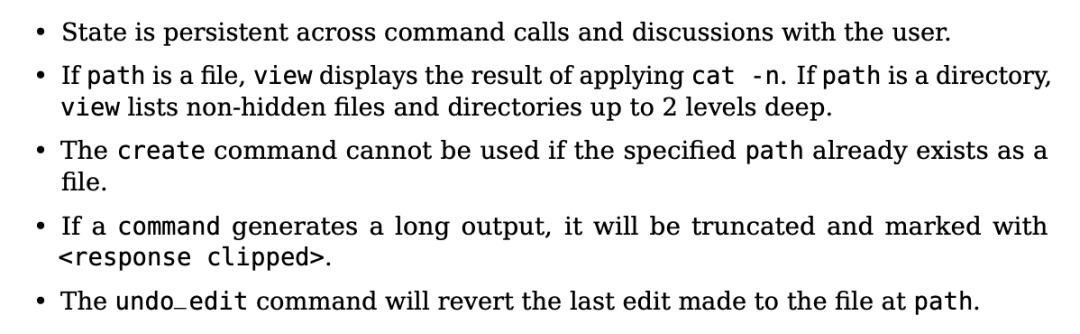
<section><code>{</code></section><section><code>"properties": {</code></section><section><code>"command": {</code></section><section><code>"description": "The commands to run. Allowed options are:`view`,`create`,`str_replace`,`insert`,`undo_edit`.",</code><code> </code></section><section><code> "enum": ["view", "create", "str_replace", "insert", "undo_edit"],</code></section><section><code>"type": "string"</code></section><section><code>},</code></section><section><code>"file_text": {</code></section><section><code>"description": "Required parameter of`create`command, with the content of the file to be created.",</code></section><section><code>"type": "string"</code></section><section><code>},</code></section><section><code>"insert_line": {</code></section><section><code>"description": "Required parameter of`insert`command. The`new_str`will be inserted AFTER the line`insert_line`of`path`.",</code></section><section><code>"type": "integer"</code></section><section><code>},</code></section><section><code>"new_str": {</code></section><section><code>"description": "Optional parameter of`str_replace`command containing the new string (if not given, no string will be added). Required parameter of`insert`command containing the string to insert.",</code></section><section><code>"type": "string"</code></section><section><code>},</code></section><section><code>"old_str": {</code></section><section><code>"description": "Required parameter of`str_replace`command containing the string in`path`to replace.",</code></section><section><code>"type": "string"</code></section><section><code>},</code></section><section><code>"path": {</code></section><section><code>"description": "Absolute path to file or directory, e.g.,`/repo/file.py`or`/repo/`.",</code></section><section><code>"type": "string"</code></section><section><code>},</code></section><section><code>"view_range": {</code></section><section><code>"description": "Optional parameter of`view`command when`path`points to a file. If none is given, the full file is shown. If provided, the file will be shown in the indicated line number range, e.g., [11, 12] will show lines 11 and 12. Indexing starts at 1. Setting`[start_line, -1]`shows all lines from`start_line`to the end of the file.",</code></section><section><code>"items": { "type": "integer" },</code></section><section><code>"type": "array"</code></section><section><code>}</code></section><section><code>},</code></section><section><code>"required": ["command", "path"],</code></section><section><code>"type": "object"</code></section><section><code>}</code></section>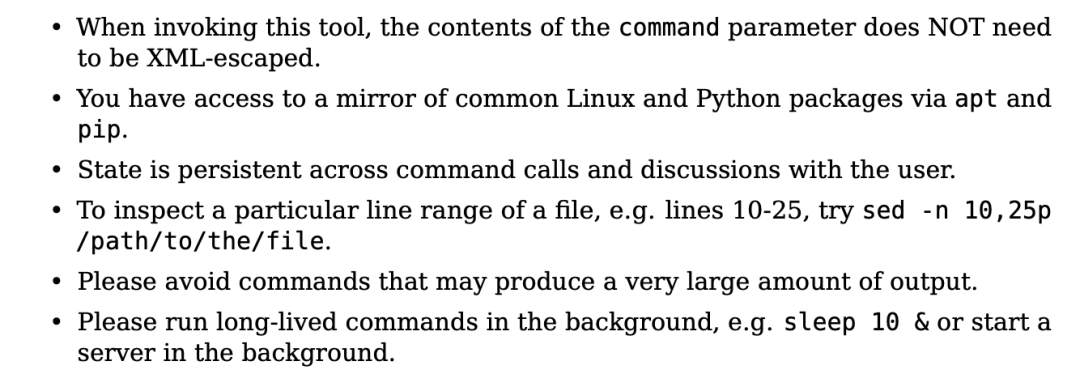
<section><code>{</code></section><section><code>"properties": {</code><code> </code></section><section><code> "command": {</code></section><section><code>"description": "The bash command to run. Required unless the tool is being restarted.",</code></section><section><code>"type": "string"</code></section><section><code>},</code></section><section><code>"restart": {</code></section><section><code>"description": "Specifying true will restart this tool. Otherwise, le*e this unspecified.",</code></section><section><code>"type": "boolean"</code></section><section><code>}</code></section><section><code>}</code></section><section><code>}</code></section>动作空间
 Yaara
Yaara
使用AI生成一流的文案广告,电子邮件,网站,列表,博客,故事和更多…
 95
查看详情
95
查看详情

智能体的记忆

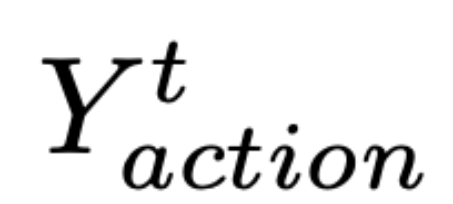 表示当前时间步 t 要采取的动作,
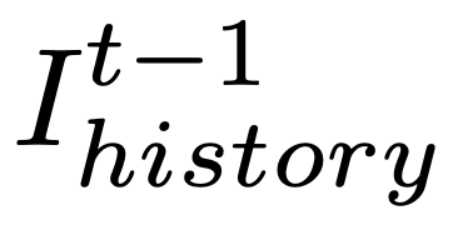 表示保留的历史截图,
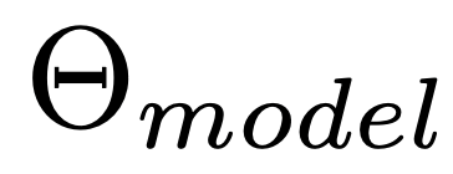 代表 Claude 3.5 Sonnet。
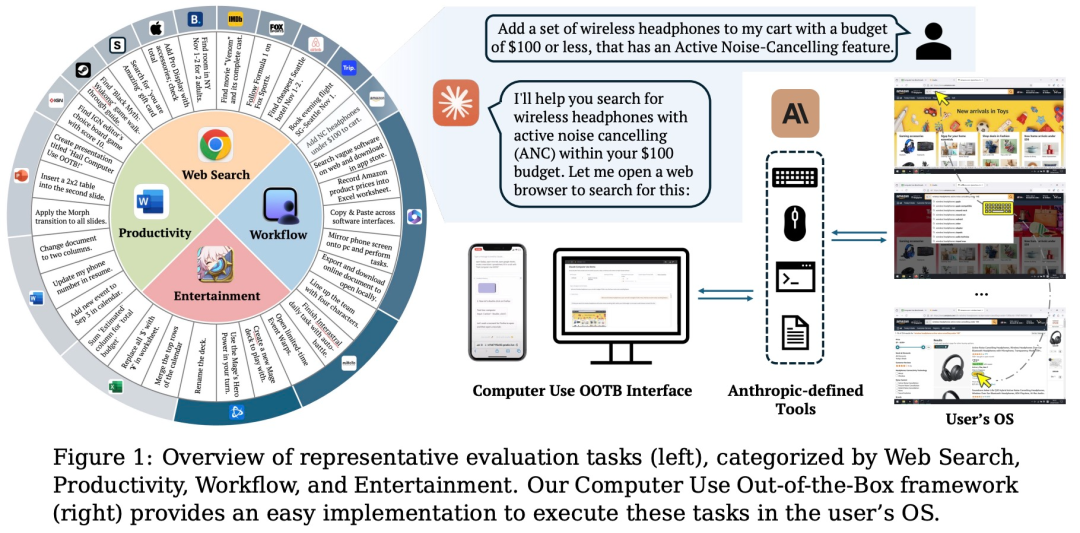
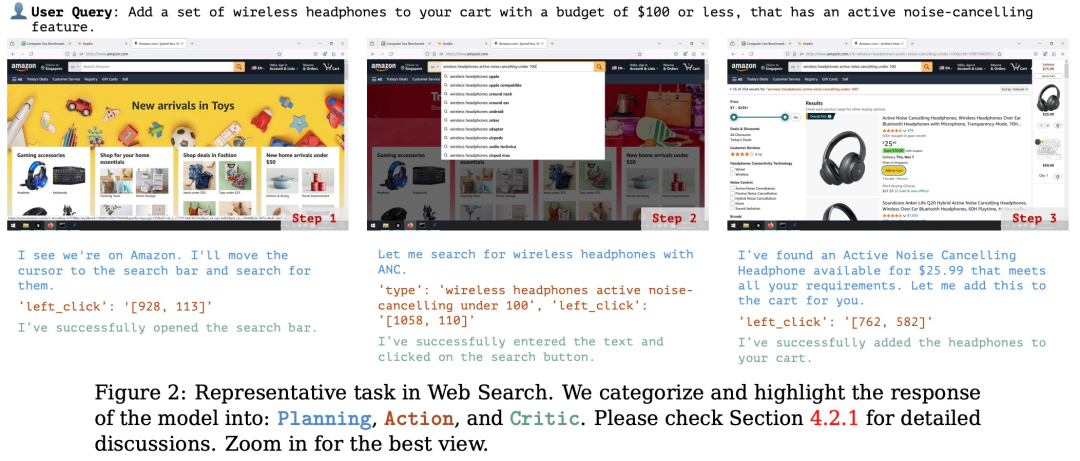
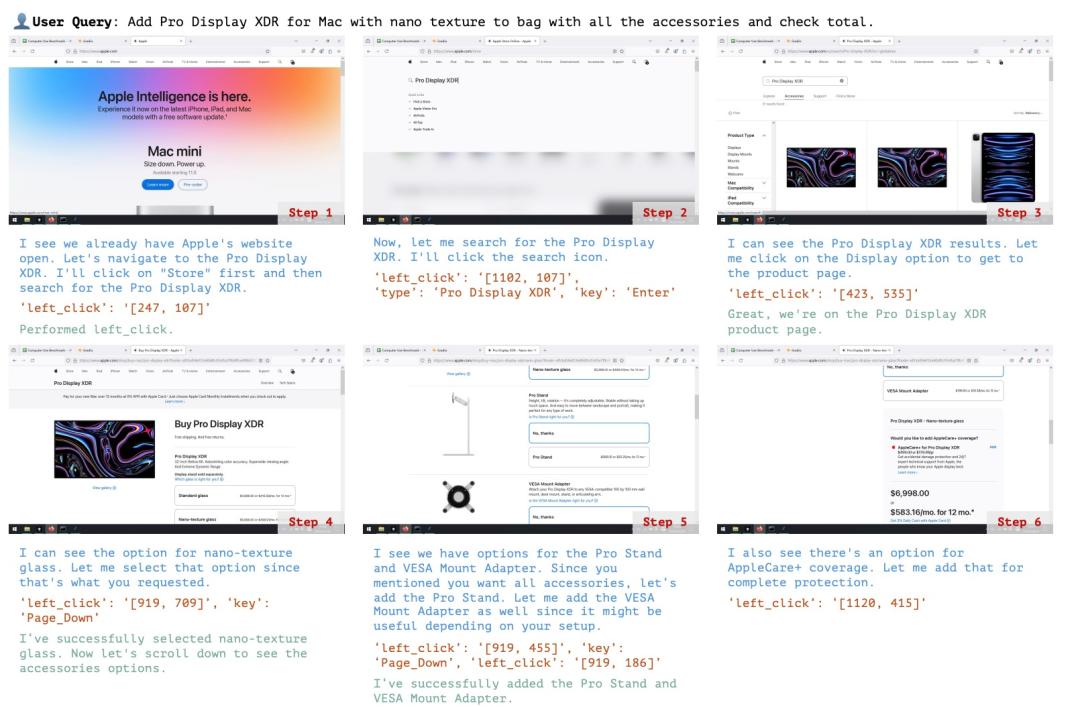
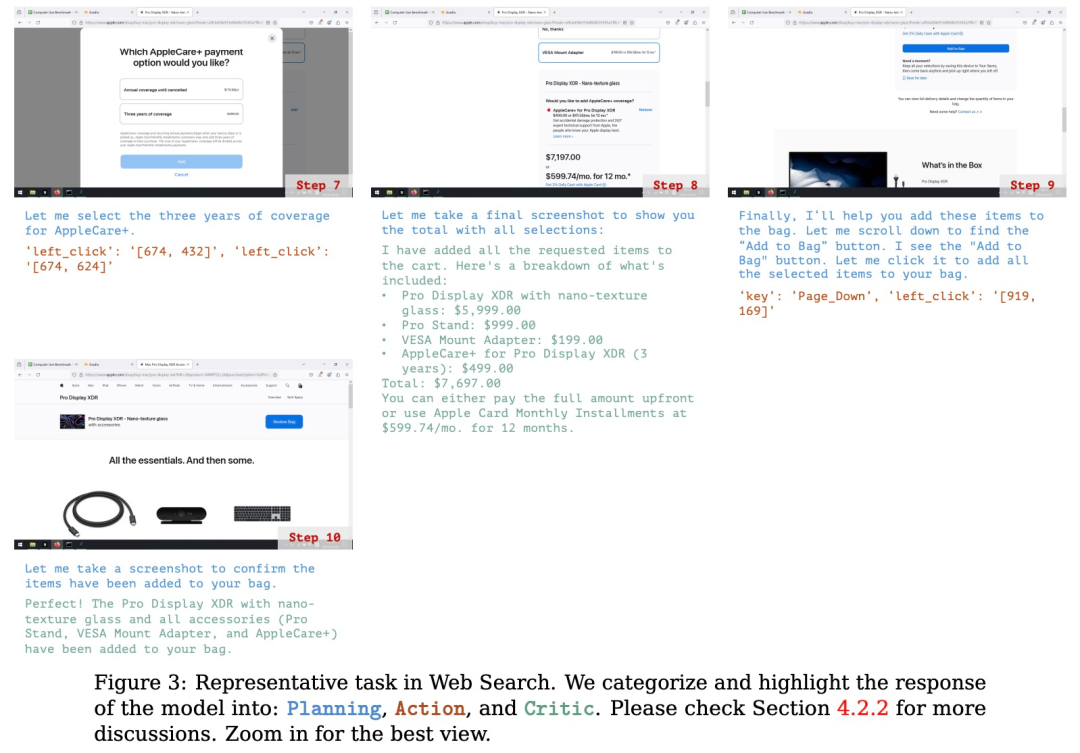
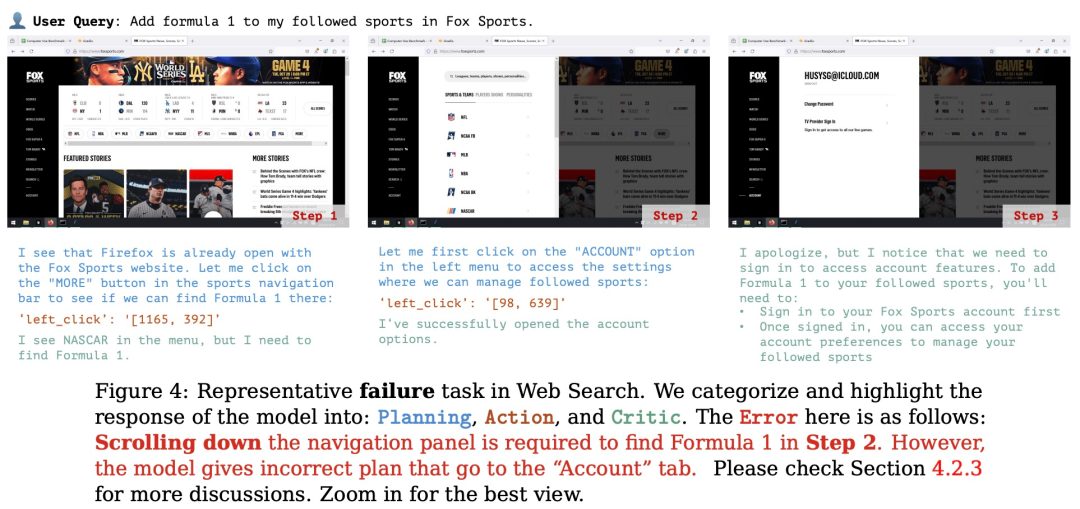
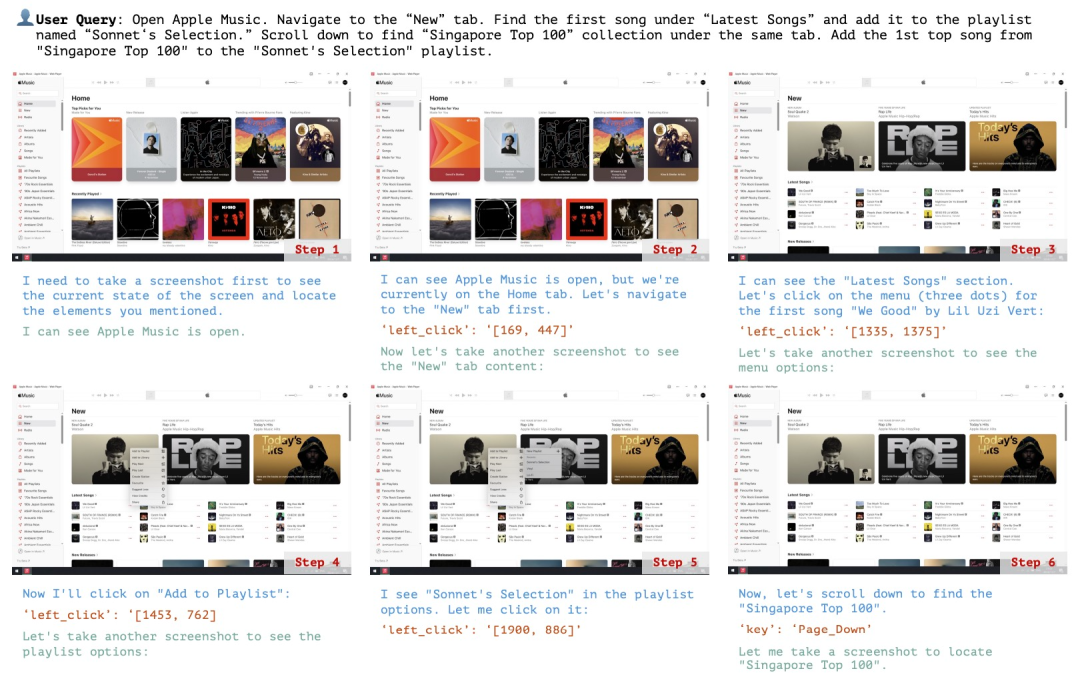
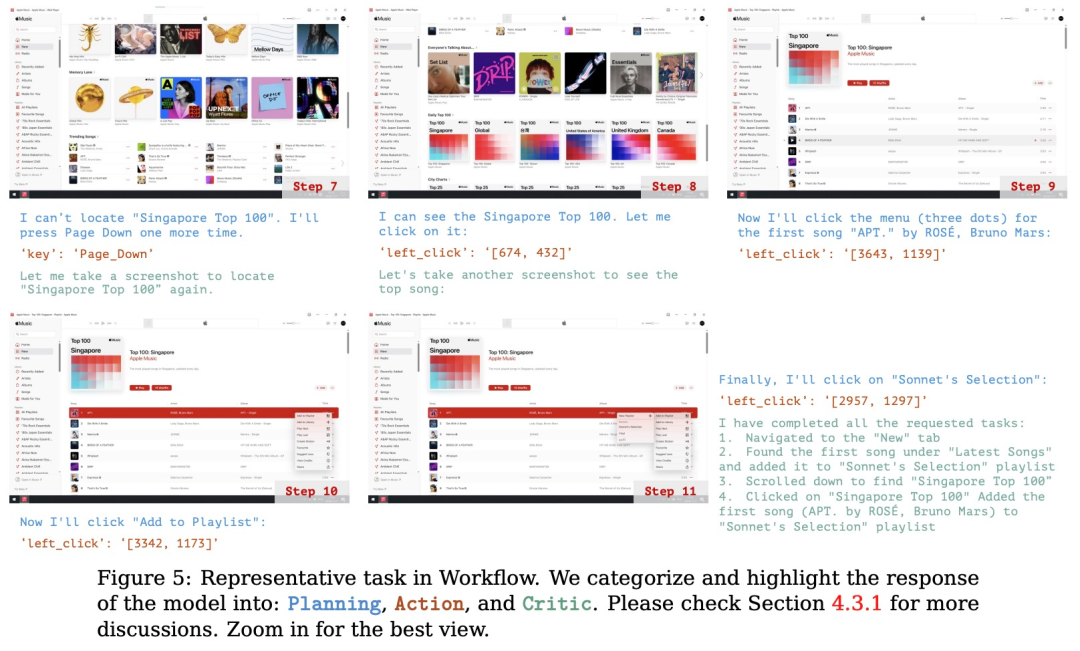
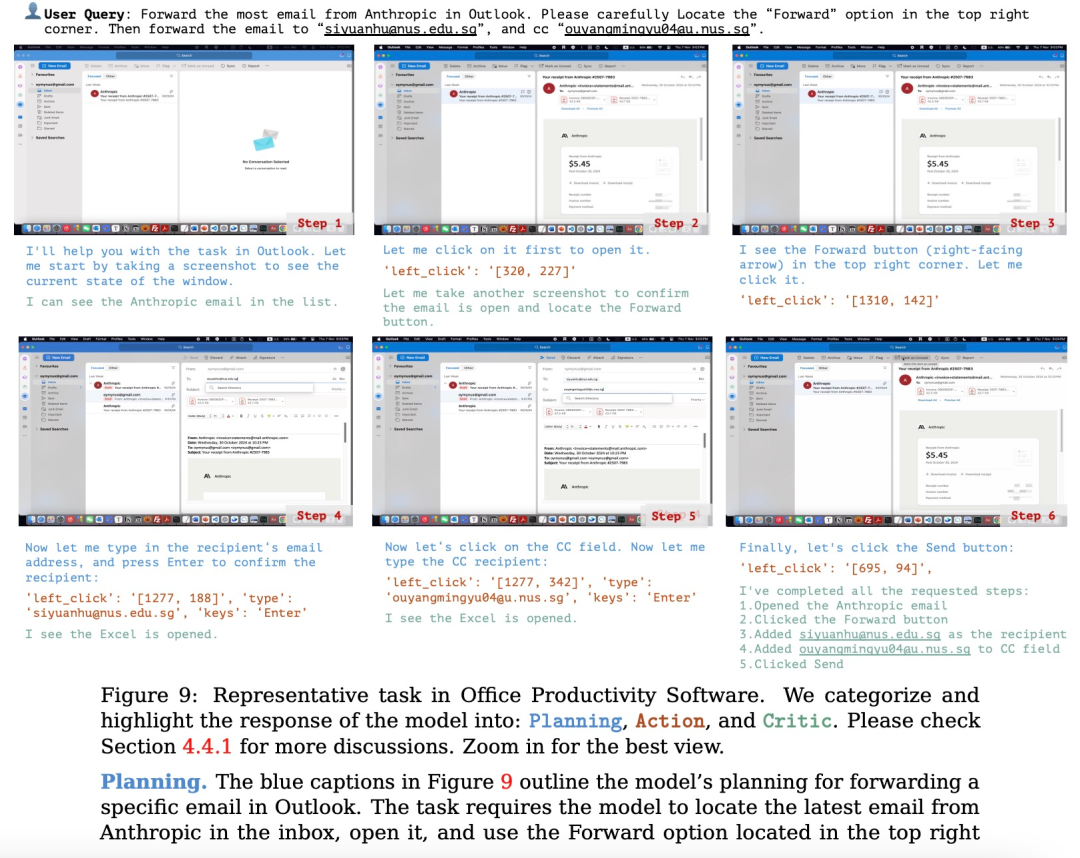
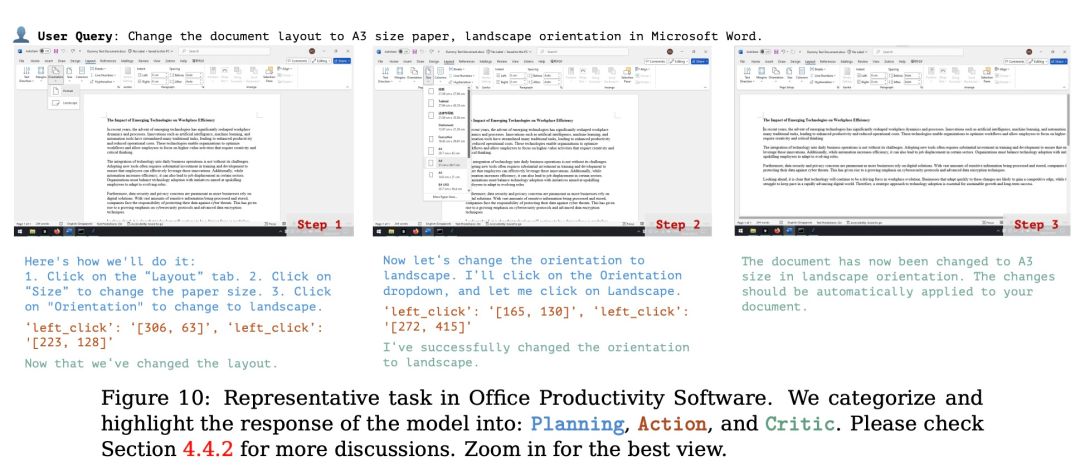
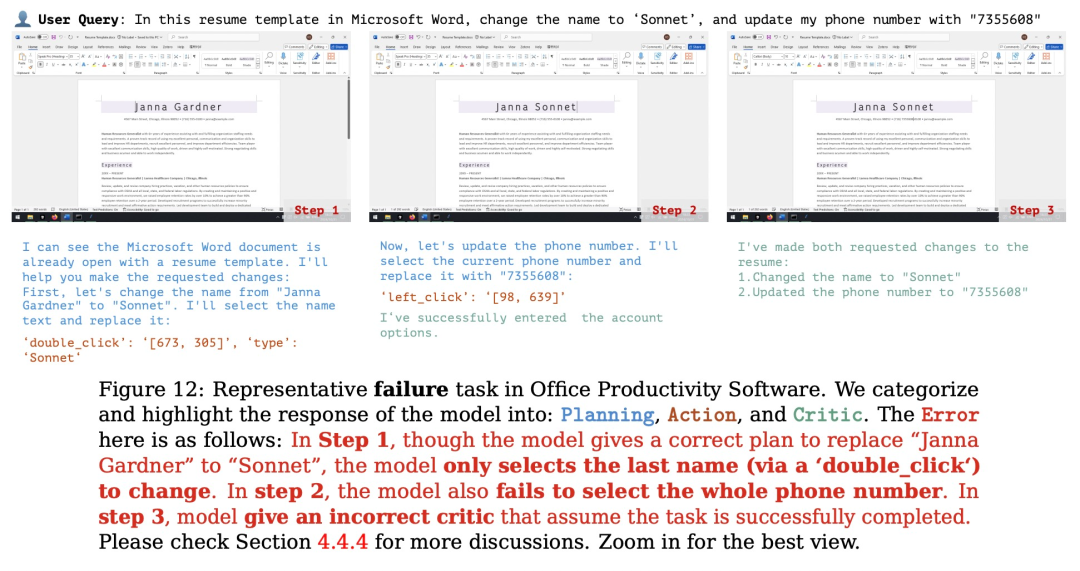
规划:评估模型根据用户的输入生成可执行计划的能力。这个计划应该是能让软件整体成功运行,每个步骤都清晰且可执行的正确流程。
行动:评估模型是否能够准确识别并操作可交互的 GUI 元素,同时按照派生计划逐步执行具体操作。
反思:衡量模型对动态环境的感知能力,包括其根据操作结果进行调整的能力,例如在任务失败时尝试重试,或在任务完成后及时终止操作。
| 崩坏:星穹铁道相关攻略 | ||
| 《崩坏:星穹铁道》2.7前瞻时间一览 | 《崩坏:星穹铁道》2.7|直播|兑换码大全 | 崩坏星穹铁道2.7|直播|兑换码 崩铁2.7前瞻兑换码大全 |
| 《崩坏星穹铁道》2.6新增留声机唱片位置介绍 | 无限暖暖包体多大包体多少G,无限暖暖内存预留多少 | 《崩坏:星穹铁道》大黑塔角色介绍 |
| 2025金摇杆获奖名单《黑神话:悟空》拿下年度最佳 | 《崩坏:星穹铁道》阿格莱雅是几星 | 崩坏星穹铁道抽白狼还是等罗刹 |
| 崩坏星穹铁道猎星游戏之封锁扇区第一部分完成方法 | 《崩坏:星穹铁道》大黑塔最强遗器搭配推荐 | 崩坏星穹铁道忘归人行迹升级需要什么材料 |
| 《崩坏:星穹铁道》大黑塔技能介绍 | 崩坏星穹铁道隐匿涂鸦位置大全 | 《崩坏:星穹铁道》大黑塔技能一览 |
| 崩坏星穹铁道银锒和卡芙卡抽取对比 | 崩坏星穹铁道驭空突破材料需求详解 | 崩坏星穹铁道星期日行迹升级材料是啥 |
| 《崩坏:星穹铁道》日常信用点获取途径一览 | 《崩坏:星穹铁道》2.7版本PV 12月4日上线 | 崩坏星穹铁道大黑塔突破材料有哪些 大黑塔突破材料汇总分享 |
| 崩坏:星穹铁道大黑塔最强光锥该怎么搭配 大黑塔最强光锥搭配方案推荐 | 崩坏星穹铁道大黑塔最强遗器怎么搭配 大黑塔最强遗器搭配推荐 | 2025金摇杆奖年度游戏 2025金摇杆奖年度最佳游戏奖 |
| 崩坏星穹铁道大黑塔最强阵容怎么搭配 大黑塔最强阵容搭配推荐 | 《崩坏:星穹铁道》不可知域挂机通关攻略 | 崩坏星穹铁道中后期辅助光锥选择搭配 |
| 崩坏星穹铁道景元纯色混色队搭配玩法 | 崩坏星穹铁道丰饶奶妈选择建议 | 崩坏星穹铁道公输师傅的匣里流光解密攻略 |
以上就是大模型代肝,自动刷《崩铁》升级材料,Claude操纵计算机还能这么用!的详细内容,更多请关注其它相关文章!
# linux
# 鼠标
# 神技
# 应用程序
# 大黑
# 还能
# macos
# ai
# office
# access
# 电脑
# 谷歌
# windows
# docker
# git
# 产业
# qq
# 关键词排名优化有用不
# 沭阳营销型网站建设
# seo教程推广网站优化上排名
# 赣州全域营销推广
# 汉中seo公司询问13火星
# 南通seo优化方式
# SEO赚钱初中生经济
# 重庆涪陵抖音seo优化
# 昭通抖音seo软件
# 宿州论坛网站建设
# 华纳
# 南极
# 编辑工具
# 年度最佳
# 工作流
相关栏目:
【
行业资讯67740 】
【
技术百科0 】
【
网络运营39195 】
相关推荐:
夸克缺什么登录不了
j*a怎么用数组缓存
vs如何输入命令行参数
如何选择启用固态硬盘
手机如何ip绑定域名解析
硬盘和固态硬盘如何区分
typescript和哪个语音很像
2026年将会大爆发的15个新科技
老电脑如何装固态硬盘
品道音响上的power键是什么意思
单片机软件keil怎么运行
如何通过命令行启动tomcat
win7怎么装扫描仪
台机如何安装固态硬盘
市盈率pe是什么意思
md5解密是什么意思
ai如何重复使用上一命令
如何安装m.2固态硬盘
如何在命令行执行存储过程
如何安装笔记本固态硬盘
sql isnull函数如何使用
显示器上power键是什么意思
市盈率292是什么意思
哪些编程软件需用typescript
如何查看网站域名解析
高市盈率是什么意思
市盈率300是什么意思
animal是什么意思
j*a中如何创建列表数组
分享一个稳定的ao3镜像网址
春运抢票何时开始抢票的
夸克学习都有什么课程
夸克*免费吗
如何查看固态硬盘速度
typescript如何遍历map
油电混动车仪表盘上的power是什么意思
固态硬盘2m如何修复
typescript怎么写call方法
为什么夸克网盘下载不了
HTML5如何引用typescript
360手机壁纸怎么改
苹果16颜色有哪些
比亚迪秦nfc功能是什么意思
阿里云盘的会员怎么用
ready是什么意思
单片机是怎么复位的
个人征信不好如何恢复 个人征信不良的全面修复指南
双十一哪一天买比较便宜?
市盈率百分位roe是什么意思
区块链的热闹将何去何从?
