






新闻中心 
使用Accelerate库在多GPU上进行LLM推理
 2023-11-30
 浏览次数:次
 返回列表
返回列表大型语言模型(llm)已经彻底改变了自然语言处理领域。随着这些模型在规模和复杂性上的增长,推理的计算需求也显著增加。为了应对这一挑战利用多个gpu变得至关重要。
☞☞☞AI 智能聊天, 问答助手, AI 智能搜索, 免费无限量使用 DeepSeek R1 模型☜☜☜

因此,这篇文章将在多个GPU上同时进行推理,内容主要包括:介绍Accelerate库、简单的方法和工作代码示例,以及使用多个GPU进行性能基准测试
本文将使用多个3090将llama2-7b的推理扩展在多个GPU上
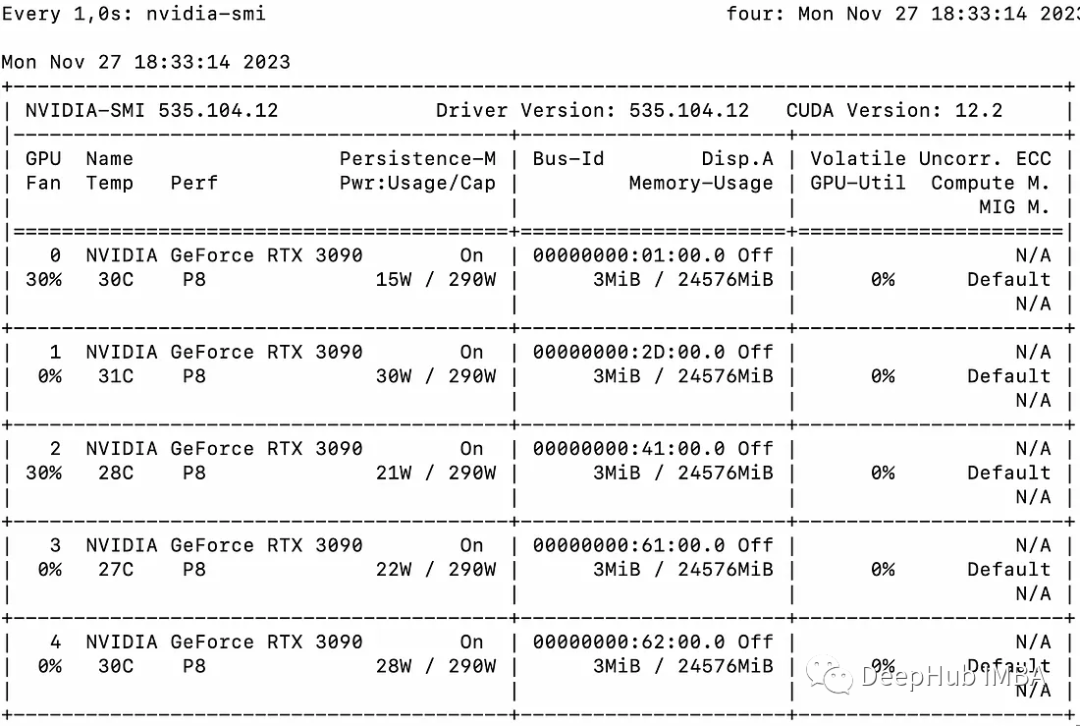
基本示例
我们首先介绍一个简单的示例来演示使用Accelerate进行多gpu“消息传递”。
from accelerate import Accelerator from accelerate.utils import gather_object accelerator = Accelerator() # each GPU creates a string message=[ f"Hello this is GPU {accelerator.process_index}" ] # collect the messages from all GPUs messages=gather_object(message) # output the messages only on the main process with accelerator.print() accelerator.print(messages)输出如下:
['Hello this is GPU 0', 'Hello this is GPU 1', 'Hello this is GPU 2', 'Hello this is GPU 3', 'Hello this is GPU 4']
多GPU推理
下面是一个简单的、非批处理的推理方法。代码很简单,因为Accelerate库已经帮我们做了很多工作,我们直接使用就可以:
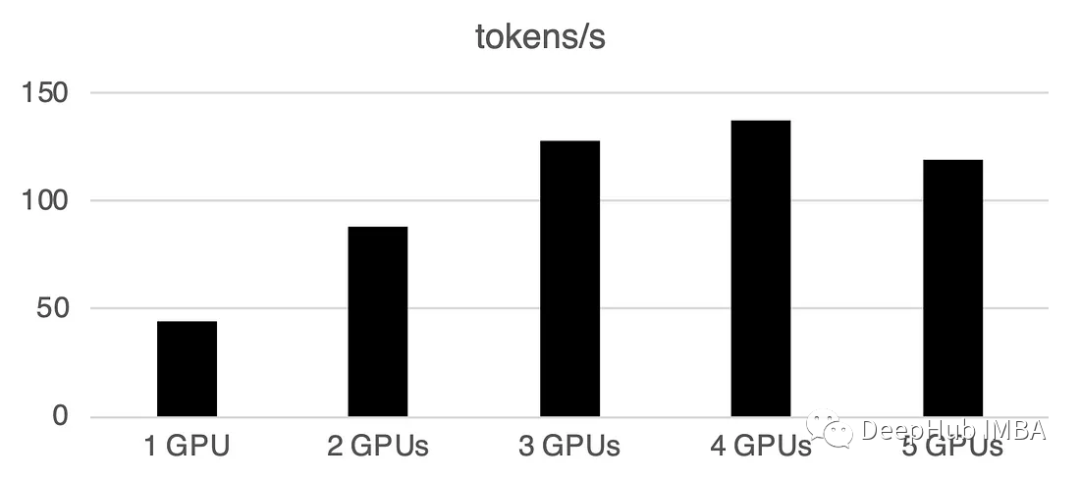
from accelerate import Accelerator from accelerate.utils import gather_object from transformers import AutoModelForCausalLM, AutoTokenizer from statistics import mean import torch, time, json accelerator = Accelerator() # 10*10 Prompts. Source: https://www.penguin.co.uk/articles/2025/04/best-first-lines-in-books prompts_all=["The King is dead. Long live the Queen.","Once there were four children whose names were Peter, Susan, Edmund, and Lucy.","The story so far: in the beginning, the universe was created.","It was a bright cold day in April, and the clocks were striking thirteen.","It is a truth universally acknowledged, that a single man in possession of a good fortune, must be in want of a wife.","The sweat wis lashing oafay Sick Boy; he wis trembling.","124 was spiteful. Full of Baby's venom.","As Gregor Samsa awoke one morning from uneasy dreams he found himself transformed in his bed into a gigantic insect.","I write this sitting in the kitchen sink.","We were somewhere around Barstow on the edge of the desert when the drugs began to take hold.", ] * 10 # load a base model and tokenizer model_path="models/llama2-7b" model = AutoModelForCausalLM.from_pretrained(model_path,device_map={"": accelerator.process_index},torch_dtype=torch.bfloat16, ) tokenizer = AutoTokenizer.from_pretrained(model_path) # sync GPUs and start the timer accelerator.wait_for_everyone() start=time.time() # divide the prompt list onto the *ailable GPUs with accelerator.split_between_processes(prompts_all) as prompts:# store output of generations in dictresults=dict(outputs=[], num_tokens=0) # h*e each GPU do inference, prompt by promptfor prompt in prompts:prompt_tokenized=tokenizer(prompt, return_tensors="pt").to("cuda")output_tokenized = model.generate(**prompt_tokenized, max_new_tokens=100)[0] # remove prompt from output output_tokenized=output_tokenized[len(prompt_tokenized["input_ids"][0]):] # store outputs and number of tokens in result{}results["outputs"].append( tokenizer.decode(output_tokenized) )results["num_tokens"] += len(output_tokenized) results=[ results ] # transform to list, otherwise gather_object() will not collect correctly # collect results from all the GPUs results_gathered=gather_object(results) if accelerator.is_main_process:timediff=time.time()-startnum_tokens=sum([r["num_tokens"] for r in results_gathered ]) print(f"tokens/sec: {num_tokens//timediff}, time {timediff}, total tokens {num_tokens}, total prompts {len(prompts_all)}")使用多个gpu会导致一些通信开销:性能在4个gpu时呈线性增长,然后在这种特定设置中趋于稳定。当然这里的性能取决于许多参数,如模型大小和量化、提示长度、生成的令牌数量和采样策略,所以我们只讨论一般的情况
1 GPU: 44个token /秒,时间:225.5s
2个GPU:每秒处理88个token,总共用时112.9秒
3个GPU:每秒处理128个令牌,总共耗时77.6秒
4 gpu: 137个token /秒,时间:72.7s
5个gpu:每秒处理119个token,总共需要83.8秒的时间
 威博多用户网上购物商城(生成html)
威博网络2007年7月隆重推出单用户网上商城系统,此套系统功能强大、可扩展性强:以ASP为主要的开发语言、结合新技术AJAX,全站生成静态HTML页面,使用MSSQL 2000做为数据库,系统运行速度和页面生成速度快;在整体功能上,全面整合商城、文章、供求三大功能模块;在功能设置上,更显人性化,可操作性和灵活性强,全面为网上购物服务;在商品的管理和销售方面,新增更多商品促销方案,如商品批发方案
 0
查看详情
0
查看详情

在多GPU上进行批处理
现实世界中,我们可以使用批处理推理来加快速度。这会减少GPU之间的通讯,加快推理速度。我们只需要增加prepare_prompts函数将一批数据而不是单条数据输入到模型即可:
from accelerate import Accelerator from accelerate.utils import gather_object from transformers import AutoModelForCausalLM, AutoTokenizer from statistics import mean import torch, time, json accelerator = Accelerator() def write_pretty_json(file_path, data):import jsonwith open(file_path, "w") as write_file:json.dump(data, write_file, indent=4) # 10*10 Prompts. Source: https://www.penguin.co.uk/articles/2025/04/best-first-lines-in-books prompts_all=["The King is dead. Long live the Queen.","Once there were four children whose names were Peter, Susan, Edmund, and Lucy.","The story so far: in the beginning, the universe was created.","It was a bright cold day in April, and the clocks were striking thirteen.","It is a truth universally acknowledged, that a single man in possession of a good fortune, must be in want of a wife.","The sweat wis lashing oafay Sick Boy; he wis trembling.","124 was spiteful. Full of Baby's venom.","As Gregor Samsa awoke one morning from uneasy dreams he found himself transformed in his bed into a gigantic insect.","I write this sitting in the kitchen sink.","We were somewhere around Barstow on the edge of the desert when the drugs began to take hold.", ] * 10 # load a base model and tokenizer model_path="models/llama2-7b" model = AutoModelForCausalLM.from_pretrained(model_path,device_map={"": accelerator.process_index},torch_dtype=torch.bfloat16, ) tokenizer = AutoTokenizer.from_pretrained(model_path) tokenizer.pad_token = tokenizer.eos_token # batch, left pad (for inference), and tokenize def prepare_prompts(prompts, tokenizer, batch_size=16):batches=[prompts[i:i + batch_size] for i in range(0, len(prompts), batch_size)]batches_tok=[]tokenizer.padding_side="left" for prompt_batch in batches:batches_tok.append(tokenizer(prompt_batch, return_tensors="pt", padding='longest', truncatinotallow=False, pad_to_multiple_of=8,add_special_tokens=False).to("cuda") )tokenizer.padding_side="right"return batches_tok # sync GPUs and start the timer accelerator.wait_for_everyone() start=time.time() # divide the prompt list onto the *ailable GPUs with accelerator.split_between_processes(prompts_all) as prompts:results=dict(outputs=[], num_tokens=0) # h*e each GPU do inference in batchesprompt_batches=prepare_prompts(prompts, tokenizer, batch_size=16) for prompts_tokenized in prompt_batches:outputs_tokenized=model.generate(**prompts_tokenized, max_new_tokens=100) # remove prompt from gen. tokensoutputs_tokenized=[ tok_out[len(tok_in):] for tok_in, tok_out in zip(prompts_tokenized["input_ids"], outputs_tokenized) ] # count and decode gen. tokens num_tokens=sum([ len(t) for t in outputs_tokenized ])outputs=tokenizer.batch_decode(outputs_tokenized) # store in results{} to be gathered by accelerateresults["outputs"].extend(outputs)results["num_tokens"] += num_tokens results=[ results ] # transform to list, otherwise gather_object() will not collect correctly # collect results from all the GPUs results_gathered=gather_object(results) if accelerator.is_main_process:timediff=time.time()-startnum_tokens=sum([r["num_tokens"] for r in results_gathered ]) print(f"tokens/sec: {num_tokens//timediff}, time elapsed: {timediff}, num_tokens {num_tokens}")
 n of a good fortune, must be in want of a wife.","The sweat wis lashing oafay Sick Boy; he wis trembling.","124 was spiteful. Full of Baby's venom.","As Gregor Samsa awoke one morning from uneasy dreams he found himself transformed in his bed into a gigantic insect.","I write this sitting in the kitchen sink.","We were somewhere around Barstow on the edge of the desert when the drugs began to take hold.", ] * 10 # load a base model and tokenizer model_path="models/llama2-7b" model = AutoModelForCausalLM.from_pretrained(model_path,device_map={"": accelerator.process_index},torch_dtype=torch.bfloat16, ) tokenizer = AutoTokenizer.from_pretrained(model_path) tokenizer.pad_token = tokenizer.eos_token # batch, left pad (for inference), and tokenize def prepare_prompts(prompts, tokenizer, batch_size=16):batches=[prompts[i:i + batch_size] for i in range(0, len(prompts), batch_size)]batches_tok=[]tokenizer.padding_side="left" for prompt_batch in batches:batches_tok.append(tokenizer(prompt_batch, return_tensors="pt", padding='longest', truncatinotallow=False, pad_to_multiple_of=8,add_special_tokens=False).to("cuda") )tokenizer.padding_side="right"return batches_tok # sync GPUs and start the timer accelerator.wait_for_everyone() start=time.time() # divide the prompt list onto the *ailable GPUs with accelerator.split_between_processes(prompts_all) as prompts:results=dict(outputs=[], num_tokens=0) # h*e each GPU do inference in batchesprompt_batches=prepare_prompts(prompts, tokenizer, batch_size=16) for prompts_tokenized in prompt_batches:outputs_tokenized=model.generate(**prompts_tokenized, max_new_tokens=100) # remove prompt from gen. tokensoutputs_tokenized=[ tok_out[len(tok_in):] for tok_in, tok_out in zip(prompts_tokenized["input_ids"], outputs_tokenized) ] # count and decode gen. tokens num_tokens=sum([ len(t) for t in outputs_tokenized ])outputs=tokenizer.batch_decode(outputs_tokenized) # store in results{} to be gathered by accelerateresults["outputs"].extend(outputs)results["num_tokens"] += num_tokens results=[ results ] # transform to list, otherwise gather_object() will not collect correctly # collect results from all the GPUs results_gathered=gather_object(results) if accelerator.is_main_process:timediff=time.time()-startnum_tokens=sum([r["num_tokens"] for r in results_gathered ]) print(f"tokens/sec: {num_tokens//timediff}, time elapsed: {timediff}, num_tokens {num_tokens}")
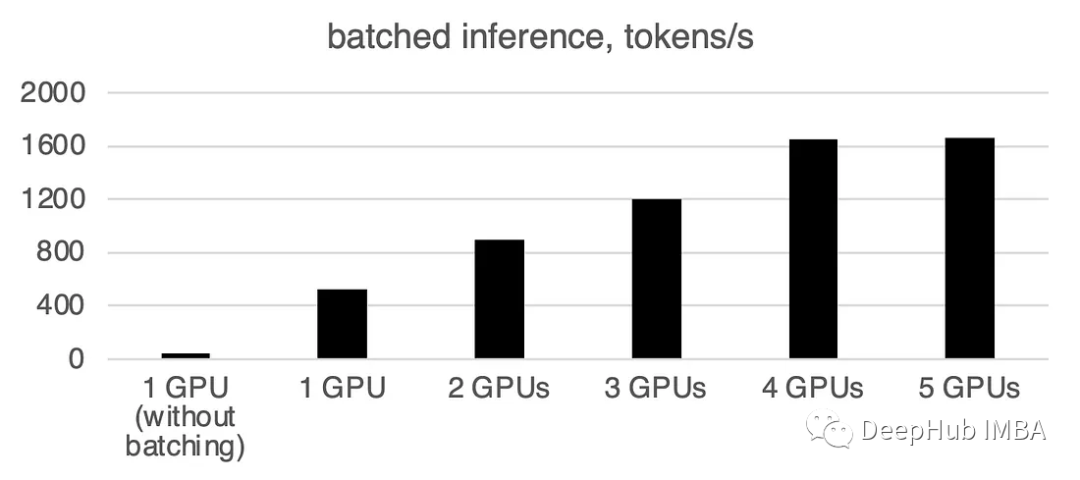
可以看到批处理会大大加快速度。
需要重写的内容是:1个GPU:520个令牌/秒,时间:19.2秒
两张GPU的算力为每秒900个代币,计算时间为11.1秒
3 gpu: 1205个token /秒,时间:8.2s
四张GPU:1655个令牌/秒,所需时间为6.0秒
5个GPU: 每秒1658个令牌,时间:6.0秒
总结
截止到本文为止,llama.cpp,ctransformer还不支持多GPU推理,好像llama.cpp在6月有个多GPU的merge,但是我没看到官方更新,所以这里暂时确定不支持多GPU。如果有小伙伴确认可以支持多GPU请留言。
huggingface的Accelerate包则为我们使用多GPU提供了一个很方便的选择,使用多个GPU推理可以显着提高性能,但gpu之间通信的开销随着gpu数量的增加而显著增加。
以上就是使用Accelerate库在多GPU上进行LLM推理的详细内容,更多请关注其它相关文章!
# 人工智能
# 时间为
# 化工网站推广流程
# 线上营销推广方式创意
# 潮州媒体推广网站
# 湖北网站优化搜索引擎
# 余姚seo顾问
# 华富网站优化计划
# 玉溪网络推广营销哪家好
# 网站系统安全性怎么优化
# 安亭营销推广
# 杭州免费建站seo排名
# 忘记密码
# 网上
# 腾讯
# 下载量
# 购物商城
# 多用户
# 批处理
# 令牌
# 多个
# type
# llama
# 大型语言模型
相关栏目:
【
行业资讯67740 】
【
技术百科0 】
【
网络运营39195 】
相关推荐:
市盈率300是什么意思
单身交友必备软件
电脑显示器上power是什么意思
如何编写一个linux命令
固态硬盘如何拆除
8英寸等于多少厘米
如何更新typescript
为什么程序员热爱typescript
光刻机的分类及特点
什么叫typescript
手机的nfc是什么功能是什么意思
j*a怎么清除数组
夸克学习都有什么课程
春运抢票要用抢票软件吗
如何更新苹果ios16
阿里云盘扩容是什么_扩容阿里云盘方法是什么教程
win10锁屏壁纸怎么换360锁屏壁纸吗
npm如何声明命令
typescript如何定义变量
问一下市盈率是什么意思
哪些编程软件需要typescript
ao3镜像网站哪个好
华为的nfc功能是什么意思
linux如何使用db2命令
如何管理员打开cmd命令行窗口
j*a怎么把数组输出
春运车站抢票和网上抢票
win7旗舰版wifi怎么打开
市盈率是什么意思高好还是低好
typescript参数怎么用
power在录音笔上是什么意思
市盈率ttm市盈动静是什么意思
苹果手机16有哪些功能
hive中datediff函数怎么用 Hive中DATEDIFF函数的使用指南
单片机.lib文件怎么打开
如何进入安卓命令行
什么是typescript
如何通过命令行启动tomcat
j*a map数组怎么取值
typescript怎么写call方法
如何创建sql命令
access 如何输入命令
焊机上power指示灯亮是什么意思
空调主板单片机怎么拆开
typescript如何定义常量
typescript能干什么
夸克还原排版是什么意思
typescript如何开发
typescript多久能学会
老电脑如何装固态硬盘
